AI Robotics & Autonomous Systems — Beginner
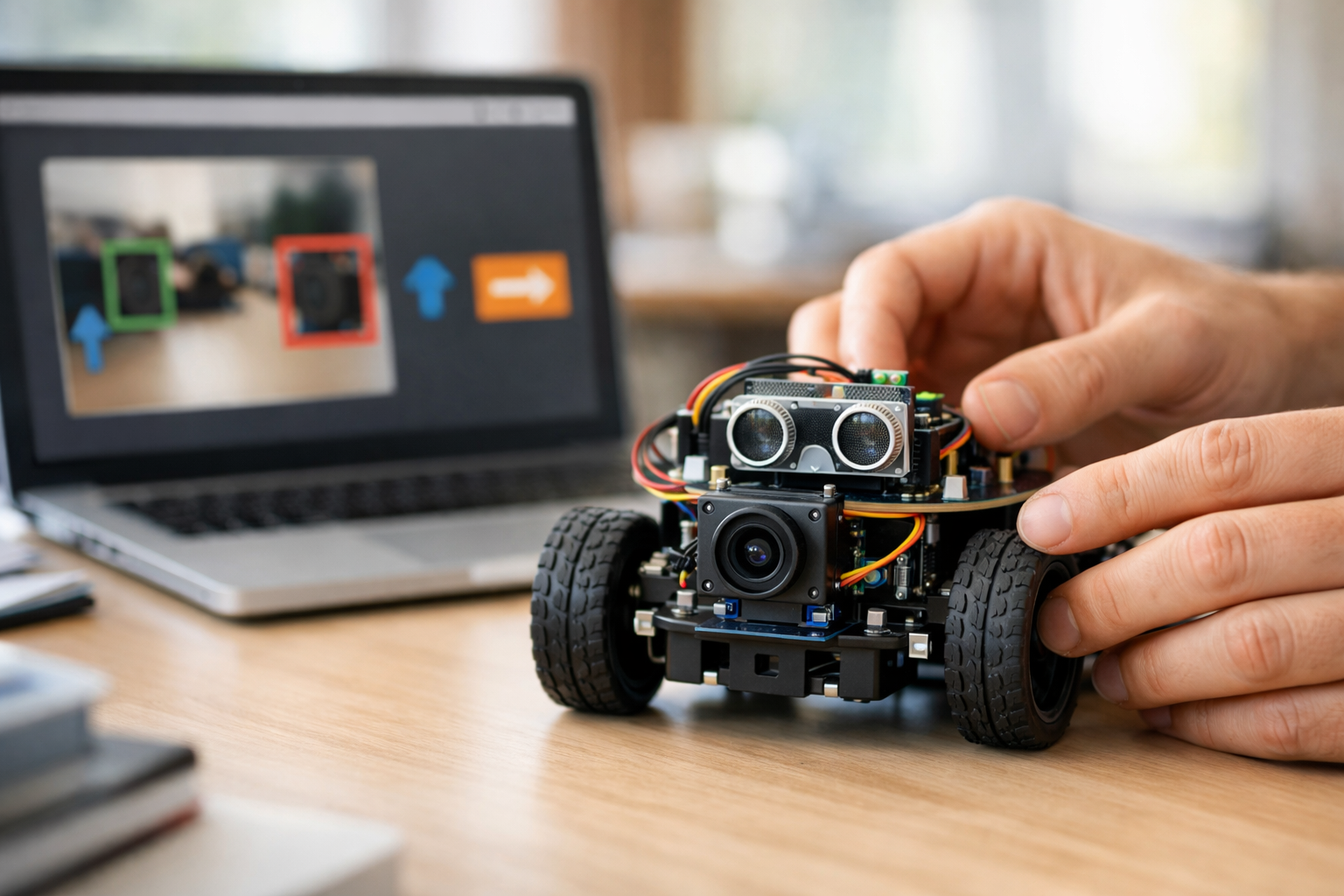
Start from zero and teach a simple robot to sense and act
AI can feel confusing when you first hear terms like machine learning, computer vision, sensors, and autonomy. This course removes that confusion. It is designed as a short, beginner-friendly technical book in six connected chapters that walk you from the very first idea to a complete simple robot workflow. If you have never studied AI, coding, robotics, or data science before, you are in the right place.
The course focuses on one exciting question: how can a robot learn to see and move? To answer that, we begin with the basics. You will learn what AI means, what makes a robot different from a normal machine, and how a robot uses sensors to gather information about the world. From there, you will explore how cameras help robots notice objects, lines, space, and movement.
This course assumes zero prior knowledge. Every topic is explained in plain language and from first principles. You do not need to know programming. You do not need a math background. You do not need to have used a robot before. Instead, you will build understanding step by step through simple examples and practical thinking.
Rather than overwhelming you with technical detail, the course helps you create a clear mental model of how a robot works:
By the end, you will understand how these parts connect into one beginner robot system.
The first chapter introduces AI, robots, sensors, motors, and the core loop of sense, think, and act. This gives you the foundation you need for everything that follows. The second chapter explains robot vision in simple terms, including images, pixels, color, edges, and basic visual clues a machine can use.
Next, you will learn how robots learn from examples. You will understand data, labels, training, testing, and what a model really does. Then you will move into decision-making: how a robot turns what it sees into simple choices such as stop, go, or turn. After that, the course introduces motion, showing how beginner robots follow paths, avoid obstacles, and move more safely. In the final chapter, you combine the pieces into a complete see-and-move robot plan.
This course is not about advanced theory. It is about giving you a beginner-safe understanding you can actually use. You will be able to explain how visual data supports robot behavior, how training improves simple tasks, and how perception connects to motion. You will also learn how to spot common beginner mistakes, such as using poor data, making rules that are too rigid, or testing movement without safety checks.
You will finish with a full conceptual blueprint for a simple robot mission, such as following a line, noticing an obstacle, or making a basic movement choice from camera input. That makes this course a strong first step into robotics, autonomous systems, and practical AI.
This course is ideal for curious learners, students, career changers, hobbyists, and professionals who want a clear entry point into AI robotics. It is especially useful if you want to understand the field before going deeper into coding, hardware, or model building.
If you are ready to start, Register free and begin your first steps in AI robotics today. You can also browse all courses to continue your learning journey after this one.
Senior Machine Learning Engineer in Robotics
Sofia Chen builds beginner-friendly AI learning programs focused on robotics, vision, and autonomous systems. She has helped new learners understand how machines sense the world, make simple decisions, and move safely through practical, step-by-step teaching.
When people first hear the words artificial intelligence or robotics, they often imagine futuristic machines that think exactly like humans. In practice, beginner robotics is much more concrete and much easier to understand. A robot is usually a machine with a body, some sensors, and a way to move. AI is a set of methods that helps the robot make useful choices from data. In this course, you will focus on a simple but powerful idea: a robot can use a camera or another sensor to observe the world, a model to interpret what it sees, and motors to respond with movement.
This chapter gives you the big picture before you build anything. You will learn the plain-language meaning of AI, robots, sensors, autonomy, and training data. You will also see how a beginner robot system fits together as a workflow: first the robot senses, then it interprets, then it decides, and finally it acts. That sequence sounds simple, but it is the foundation of many real systems, from warehouse robots to robot vacuums to delivery machines.
A useful way to think about robotics is to separate four jobs that beginners often mix together. Sensing is collecting raw information, such as an image from a camera or a distance reading from an ultrasonic sensor. Perception is turning that raw input into something meaningful, such as “there is a box ahead” or “the floor is open on the left.” Decision-making is choosing what to do next, such as stopping, turning, or moving forward. Action is the physical output: the motors spin, the wheels turn, and the robot changes position.
You will also begin using basic engineering judgment. In robotics, the goal is not to make a perfect system on the first try. The goal is to make a system that works well enough for a clear task, then test it, find failure cases, and improve it. For example, if a robot must follow open space in a hallway, it does not need human-level intelligence. It needs dependable sensing, clear labels for examples, a simple model, and enough testing in realistic conditions.
By the end of this chapter, you should be able to describe a simple robot in terms of its parts and its workflow. You should understand how training data helps a model learn from examples, why labels matter, why testing matters, and why robots are harder to build than software-only AI. A robot lives in the physical world, where lighting changes, floors are uneven, batteries run low, and sensors are noisy. That is exactly what makes robotics exciting: even a beginner project teaches you how intelligence connects to real movement.
In the sections that follow, you will build a practical mental model of smart machines. Keep your focus on simple examples. If a camera sees an obstacle, the robot should stop. If it sees open space, it can continue. If a model is uncertain, it may slow down or ask for human help. These are modest behaviors, but they contain the core ideas behind intelligent robots.
Practice note for See the big picture of AI and robotics: document your objective, define a measurable success check, and run a small experiment before scaling. Capture what changed, why it changed, and what you would test next. This discipline improves reliability and makes your learning transferable to future projects.
Practice note for Understand what makes a robot different from a regular machine: document your objective, define a measurable success check, and run a small experiment before scaling. Capture what changed, why it changed, and what you would test next. This discipline improves reliability and makes your learning transferable to future projects.
In everyday language, AI means a computer system that can use data to make a useful guess, choice, or prediction. It does not need to be magical, conscious, or human-like. If a system looks at many examples of pictures and learns to tell “chair” from “floor,” that is AI. If it uses those results to help a robot avoid bumping into furniture, that is applied AI in robotics.
For beginners, a helpful definition is this: AI is software that learns patterns from examples or rules so it can handle tasks that would be hard to describe with simple fixed instructions. A normal program might say, “if distance is less than 20 centimeters, stop.” An AI-based perception system might say, “from this camera image, I think there is a wall ahead.” Both can exist in the same robot. In fact, many practical robots combine simple programmed logic with learned models.
One common mistake is to think AI is the whole robot. It is not. AI is usually one part of the system. Another mistake is to think AI always means training a large complicated model. For a beginner robot, AI can be as simple as a small image classifier that learns a few labels such as open path, obstacle, and target object. The important idea is that the system improves because it has seen examples.
Training data is central here. Training data is a collection of examples the model learns from. Labels are the names attached to those examples, such as “box,” “doorway,” or “empty floor.” If the labels are wrong or inconsistent, the robot learns poorly. If the examples are too limited, such as only bright rooms and no dim rooms, the model may fail in real use. Good engineering judgment means collecting examples that match the environment where the robot will operate.
Testing is different from training. During training, the model learns. During testing, you check whether it works on new examples it did not memorize. Improvement comes from this cycle: gather data, label data, train a model, test it, inspect mistakes, then refine the system. That simple idea will appear again throughout this course because it is the practical backbone of beginner AI.
A robot is more than a machine with moving parts. A fan spins, a washing machine agitates, and an elevator moves, but those machines are usually designed for fixed repeated actions in controlled conditions. A robot, by contrast, is built to sense its environment, process information, and adjust its actions based on what it detects. That ability to react to changing conditions is what makes a robot feel “smart,” even if the underlying logic is simple.
A practical beginner definition is this: a robot is a physical system that can sense, compute, and act in the world. It usually has sensors to gather information, a controller or computer to process that information, and actuators such as motors to create movement. Some robots are teleoperated, meaning a human directly controls them. Some are partly autonomous, meaning they can do certain tasks on their own. Some are highly autonomous within a narrow job, such as vacuuming a floor or carrying shelves in a warehouse.
It is also important to understand what a robot is not. A robot is not automatically intelligent just because it moves. A toy car with a simple on-off switch is a machine, but not much of a robot if it cannot sense or adapt. A chatbot is AI software, but not a robot unless it is connected to a physical body that senses and acts. Robotics sits at the intersection of software, electronics, mechanics, and control.
Beginners often overestimate autonomy. Autonomy does not mean the robot can do anything. It means the robot can complete some steps without constant human input. A line-following robot is autonomous in a narrow task. A camera robot that detects open space and avoids obstacles is more flexible, but still limited. Good engineering starts by defining a small mission clearly: what should this robot do, where will it work, and what counts as success?
That mission-first thinking keeps projects realistic. Instead of saying, “I want to build a smart robot,” say, “I want to build a wheeled robot that uses a camera to detect obstacles and move safely through a simple indoor path.” That sentence already points to sensors, labels, training data, movement rules, and testing conditions. In robotics, a clear task definition is often the difference between a fun successful project and a frustrating vague one.
If AI is the “brain-like” part of a robot, then sensors and motors are how that intelligence connects to the world. Sensors collect information. Motors and other actuators produce motion or force. The robot body holds everything together and shapes what the robot can physically do. This is why robotics is not just coding. A great model cannot help much if the camera is shaky, the wheels slip, or the battery is weak.
Common beginner sensors include cameras, distance sensors, touch sensors, wheel encoders, and microphones. A camera can provide rich visual information, which is why it is often used for object detection and finding open space. A distance sensor gives a simpler measurement, such as how far away a wall is. Cameras are flexible but sensitive to lighting, blur, and angle. Distance sensors are simpler but cannot describe the whole scene. In many practical robots, combining sensors gives better results than relying on only one.
Motors convert electrical energy into movement. On a simple wheeled robot, two drive motors may control forward motion and turning. Servos might aim a sensor or move a small arm. The body design matters too. A low stable base may move safely on smooth floors, while a tall narrow robot may wobble and confuse its own camera. Engineering judgment means choosing hardware that matches the task rather than choosing the most advanced-looking components.
One useful beginner map of the robot body is: sensors for input, processor for computation, power system for energy, actuators for movement, and frame for support. If one part is weak, the whole robot suffers. For example, poor cable placement can disconnect a camera. Low battery voltage can make movement inconsistent. A camera mounted too low may only see the floor and miss obstacles.
Common mistakes at this stage include ignoring sensor noise, forgetting calibration, and assuming parts behave perfectly. Real sensors are messy. Images can be overexposed. Ultrasonic readings can bounce oddly. Wheels may not spin at exactly the same speed. This is normal. A good roboticist expects imperfections and designs around them with testing, safety margins, and simple fallback behaviors such as slowing down when confidence is low.
The easiest way to understand robot behavior is as a repeating loop: sense, think, and act. First, the robot senses the world by gathering data from a camera or other sensors. Next, it thinks by interpreting that data and selecting a response. Finally, it acts by sending commands to motors or other outputs. Then the loop repeats. This cycle may happen many times per second.
To make this practical, break the “think” step into two parts: perception and decision-making. Perception answers, “What is happening around me?” A camera model might estimate that the robot sees an obstacle ahead and open space to the right. Decision-making answers, “Given that situation, what should I do next?” A simple rule could be: if obstacle ahead, stop and turn toward open space. Action then carries out that choice through wheel motion.
This separation matters because beginners often mix the stages together. A blurry image from the camera is a sensing problem, not a motor problem. A model that mistakes shadows for obstacles is a perception problem. A robot that correctly detects a box but still drives into it may have a decision logic or control problem. When you divide the system into stages, debugging becomes much easier.
A beginner visual workflow might look like this:
Autonomy grows from this loop. If a human must choose every move, the robot is teleoperated. If the robot can run this loop on its own for a limited task, it has autonomy in that task. But autonomy should be earned through testing, not assumed. A wise beginner starts with slow speed, safe environments, and emergency stop options. Practical robotics is as much about safe reliable behavior as it is about clever models.
The loop also shows where improvement happens. Better sensing may come from a cleaner camera view. Better perception may come from more training data and better labels. Better decisions may come from simpler, clearer movement rules. Better action may come from tuning motor control. This is a powerful lesson: robot performance depends on the whole chain, not just on AI alone.
Robots that see and move already exist in many places, although their intelligence is usually narrower than movies suggest. A robot vacuum senses walls, furniture, edges, and room layout well enough to clean a floor. A warehouse robot may detect shelves, lanes, markers, and people so it can transport items safely. A farm robot may use cameras to identify crops, weeds, or rows. A delivery robot may look for sidewalks, obstacles, and stopping points. These are all examples of machines combining sensing, perception, decision-making, and action.
Notice something important: each robot solves a specific job in a specific environment. A warehouse robot often works on smooth floors with known routes. A robot vacuum works indoors at low speed. This narrow focus makes autonomy more achievable. Real engineering is often about reducing the problem until the robot can perform it reliably.
Consider a simple camera-based obstacle robot. Its camera captures a forward view. A perception model labels parts of the scene as open path or obstacle. The decision logic chooses among go forward, turn left, turn right, or stop. The motors execute that command. If the robot performs poorly near bright windows, that tells you the training data may not include enough lighting variation. If it works in the lab but fails on patterned carpets, the labels or examples may not match the real deployment setting.
These examples teach a practical lesson about models and labels. A model is not a magical answer machine. It is a pattern-finder trained on examples. Labels define what the model is supposed to learn. If your labels are too vague, such as mixing chairs and open gaps into the same category, the robot’s decisions will be confused. If your testing only happens on easy scenes, you may believe the robot is better than it really is.
In real projects, improvement is continuous. Engineers review mistakes, collect more diverse data, fix incorrect labels, adjust thresholds, and tune motor behavior. They also add safeguards. For example, if the camera model is uncertain, the robot may slow down or stop. That is good engineering judgment. Safe behavior under uncertainty is often more valuable than aggressive behavior that works only sometimes.
Your first robot project should be small, clear, and testable. A strong beginner goal is to build a simple wheeled robot that uses a camera to distinguish between open space and obstacles, then choose a safe direction to move. This project teaches the exact concepts introduced in this chapter: AI in plain language, robot parts, sensing versus perception, training data, labels, testing, and action.
Start by defining the mission. For example: “The robot should move slowly indoors and avoid obvious obstacles in a simple room.” Next, map the system parts. You need a camera for seeing, a small processor for running code, motors for movement, a battery for power, and a chassis to hold everything. Then define the workflow: capture images, label examples, train a simple model, test the model, connect predictions to movement rules, and evaluate the full robot in a safe area.
A practical roadmap looks like this:
Common beginner mistakes include trying to detect too many object types at once, collecting too little data, changing labels halfway through, and driving too fast before the perception system is stable. Another mistake is skipping offline testing. Before the robot moves, check whether the model makes sensible predictions on images it has not seen before. This saves time and reduces crashes.
The practical outcome of this roadmap is not just one robot demo. It is a mental framework you can reuse for every future system. You will learn to ask: What does the robot sense? How does it interpret the data? What decision does it make? What action follows? How do I know it works? Those questions are the beginning of robotics engineering. In the next chapters, you will build on this foundation and turn these ideas into a working beginner robot pipeline.
1. According to the chapter, what makes a robot different from a regular machine?
2. What is the correct beginner robot workflow described in the chapter?
3. Which example best matches perception rather than sensing?
4. Why are labels important in training data?
5. Why does the chapter say robots are harder to build than software-only AI?
When people say a robot can “see,” they do not mean it sees in the rich, human way that you do. A robot does not automatically understand that a shiny rectangle is a phone, that a chair is meant for sitting, or that a hallway is safe to walk through. What it gets first is sensor data. In this chapter, we focus on the most familiar visual sensor: the camera. A camera gives a robot streams of digital images, and those images become the starting point for perception. Perception is the step where raw sensor readings are turned into useful clues such as object locations, edges, motion, and open space.
This chapter connects directly to the beginner robot workflow you will use throughout the course: sense, perceive, decide, and act. The camera handles sensing. Image processing and models help with perception. Rules or learned policies support decision-making. Motors and steering carry out action. Keeping these steps separate in your mind is important. It helps you debug problems. If a robot bumps into a box, the problem might not be the movement system. It may be that the camera image was too dark, the object detector missed the box, or the decision logic reacted too slowly.
A practical engineer always asks: what exactly does the robot need to notice to do the job safely and simply? For a beginner robot, the goal is not to understand everything in a scene. The goal is to detect enough information to support a useful action. That may mean recognizing a red ball, spotting a black line on the floor, or identifying open floor space instead of furniture. These are realistic first tasks because they connect image data to movement in a clear way.
You will also begin to see the difference between human vision and machine vision. Humans use memory, context, and common sense. Machines use pixels, patterns, labels, thresholds, and models. A human can recognize a cup in poor lighting with only a quick glance. A beginner robot may fail unless it has seen many examples of cups in different sizes, colors, and positions. This does not mean robots are “bad” at vision. It means robot vision is engineering: we choose sensors, prepare examples, define tasks, test performance, and improve the system step by step.
Another major idea in this chapter is training data. If you want a robot to learn from examples, you must show it many images and tell it what matters in each one. These labels might be simple categories like “ball” and “not ball,” or they might mark image regions such as “floor,” “wall,” and “obstacle.” Good training data makes learning easier. Poor training data teaches the wrong lesson. That is why collecting and checking image examples is not busywork. It is one of the main engineering jobs in AI robotics.
As you read, keep one practical question in mind: if I wanted a robot to move safely through a small room, what would the camera need to provide? The answer is not “everything.” It might only need to provide visual clues about boundaries, obstacles, and open space. By the end of this chapter, you should be able to explain how cameras create digital images, how robots notice shape, color, and motion, how those clues differ from human understanding, and how to prepare image examples for a simple training task.
The sections that follow build from the basics of pixels to the practical question of choosing a first vision task. Read them as part of one workflow, not six unrelated ideas. A robot sees the world by collecting images, finding patterns in those images, turning patterns into actionable information, and improving through examples and testing.
A camera is a sensor that measures light. That simple statement explains a lot. The camera does not know what a chair, person, or doorway is. It only records how much light reaches its sensor at many tiny locations. Each tiny location becomes a pixel in the final image. You can think of an image as a grid of little boxes, where every box stores a brightness value or a color value. When enough pixels are arranged together, patterns appear that humans instantly recognize as objects and spaces.
For a robot, this digital image is the raw input to vision. A common beginner mistake is to assume the image itself already contains meaning. It does not. Meaning must be computed or learned from the pixel values. If one area of the image is dark and another is bright, that difference may indicate a shadow, an edge, or a real object boundary. The robot needs additional processing to tell the difference.
Resolution matters because it controls how much detail the robot can capture. A high-resolution image can show small objects more clearly, but it also requires more memory and more computation. A low-resolution image is faster to process, which is useful on small robots, but details can disappear. Good engineering judgment means choosing resolution based on the task. If your robot only needs to follow a wide colored line, very high resolution may be unnecessary. If it needs to detect a small toy on the floor, more detail may help.
Frame rate matters too. A single image is useful, but many robot tasks depend on a stream of images over time. If the camera captures images too slowly, the robot may react late to motion or obstacles. If it captures too quickly without enough processing power, the system may lag anyway. The practical lesson is that camera design is a trade-off: image size, speed, lighting, and available compute must all fit the job.
Another practical point is camera placement. A camera mounted too high may miss low obstacles. A camera pointed too low may see only the floor. A wide-angle camera captures more of the scene but can distort shapes. Beginners often focus only on software, but physical setup changes the data before any algorithm begins. Good robot vision starts with sensible sensing.
So, when we say a robot sees, the first truth is this: it measures light and stores it as digital images made of pixels. Everything else in machine vision builds on that foundation.
Once a robot has an image, the next question is what useful visual clues can be found inside it. At a basic level, robots can notice light, color, edges, texture, and motion. These clues are simpler than full understanding, but they are often enough for practical tasks. For example, a robot may not know it is looking at a “hallway,” yet it can detect two long edges that suggest boundaries and a lighter central region that may be open space.
Color is one of the easiest clues to explain. Many images store color using red, green, and blue values for each pixel. If a robot is trained to find a bright red ball, it may search for areas where red values are strong compared with blue and green. This can work well in a controlled classroom or lab. However, lighting changes color appearance. A red object under dim light may not look bright red anymore. This is why color-based systems are easy to start with but sometimes fragile in the real world.
Edges are another key idea. An edge is a place where the image changes quickly, such as from dark to light or from one color to another. Edges often mark boundaries of objects, walls, or floor lines. Line-following robots, for example, often rely on strong contrast between a dark line and a lighter floor. Detecting edges helps reduce the image to the structure that matters.
Patterns and texture add more clues. Grass, carpet, tiles, and brick walls may all have different visual textures. A robot can learn that some textures are likely to be floor while others are likely to be obstacles or background surfaces. This is useful because real scenes are messy. Not every important feature is a clean edge or a bright color patch.
Motion is also important when images arrive as a sequence. If an object changes position from one frame to the next, the robot can infer movement. This may indicate a person walking, another robot passing by, or the robot itself turning. Motion cues are helpful, but they require care. The entire scene can appear to move when the robot moves, so the system must distinguish between self-motion and object motion when possible.
Human vision uses these same kinds of clues, but people combine them with experience and common sense. Machine vision is more literal. It searches for measurable features and learned patterns. That difference explains why robots can be very accurate in well-defined tasks and still fail in situations that humans find obvious. Practical robot vision begins by choosing visual clues that are stable enough for the environment and simple enough for the task.
A raw image is only the beginning. To make it useful, a robot usually applies some form of processing. This can be a hand-built method, a learned model, or both. The purpose is always the same: turn large amounts of pixel data into a smaller set of clues that support decisions. In a beginner workflow, this often means cleaning the image, highlighting important regions, and extracting features the robot can use.
A common first step is preprocessing. This may include resizing the image, reducing noise, adjusting brightness, or converting color spaces. For example, if the robot only needs to follow a blue marker, the image may be transformed into a format where blue regions are easier to isolate. Preprocessing does not make the robot intelligent by itself, but it can make later steps much more reliable.
After preprocessing, the system often identifies candidate features. It might look for strong edges, connected color regions, corners, contours, or areas of movement between frames. Each of these is a clue rather than a final answer. A large red region might be a ball, or it might be a poster on the wall. A long dark line might be a floor path, or it might be the edge of a shadow. Good perception often combines several clues before making a judgment.
This is where models and labels enter the picture. In machine learning, a model is a pattern-finding system trained on examples. Labels tell the model what each example represents. For a simple classifier, labels might be “toy car,” “ball,” and “background.” For a detector, labels may include bounding boxes around objects. For a segmentation task, labels may assign every pixel to categories such as floor, obstacle, or wall. The model learns to connect raw image patterns to the labeled concepts.
Testing is essential because a system can appear to work during setup and then fail in new conditions. Engineers therefore compare performance on images the model has not already seen. This helps answer practical questions: does it still detect the target when lighting changes, when the camera angle shifts, or when the object is partly hidden? Beginners often skip this step and trust a few successful demos. Real improvement comes from careful evaluation, then revising data, labels, or methods based on what failed.
The main lesson is that perception is not magic. It is a workflow that transforms raw images into useful visual clues. Once those clues are available, the robot can begin to decide what to do next.
Most beginner robot vision tasks fall into three practical groups: finding objects, finding lines or boundaries, and finding free space. These tasks are easier to start with than trying to understand an entire scene. They also connect directly to movement. If a robot can detect a target object, it can approach it. If it can detect a line, it can follow a path. If it can detect free space, it can avoid obstacles and move more safely.
Object finding means locating something specific in the image, such as a bottle, box, ball, or person. The output might be a category label, a box around the object, or a center point the robot can aim toward. This is useful for pick-and-place tasks or for simple chasing and tracking behavior. A practical challenge is variation. The object may appear at different sizes, rotations, distances, or lighting conditions. Good systems must be trained or designed with that variation in mind.
Line and boundary finding is common in educational robots. A dark strip on a light floor, colored tape, or lane-like markings can guide movement. These tasks often use strong contrast or color difference to isolate the path. The advantage is simplicity. The disadvantage is that the robot may fail when shadows, reflections, or worn markings resemble the target line. This is why testing in the real environment matters more than success on a clean desk or lab table.
Free-space detection asks a different question: where is it safe to move? Instead of identifying one specific object, the robot tries to separate open areas from obstacles. This can be done with simple image heuristics or with learned segmentation models. For navigation, free-space detection is often more useful than recognizing object names. A robot does not always need to know that an obstacle is a chair. It just needs to know not to drive into it.
These outputs fit into the wider robot pipeline. Sensing provides the image. Perception identifies objects, lines, or open areas. Decision-making chooses an action, such as turn left, slow down, or move forward. Action sends commands to the motors. Keeping this flow clear helps with debugging. If the robot turns the wrong way, ask whether the visual output was wrong, the decision rule was wrong, or the motor command was wrong. That discipline is a core skill in robotics engineering.
In practice, the best first system is usually the narrowest one that solves the task. Start small, verify it works, and only then expand complexity.
Training data is one of the most important parts of robot vision, especially when using machine learning. A robot learns from examples, so the examples must match the real task. Good image data is varied, clear, correctly labeled, and representative of the environment where the robot will operate. Bad image data is narrow, repetitive, mislabeled, or collected only under perfect conditions that will not last in practice.
Imagine you want a robot to detect a blue cup. If every training image shows the same cup on the same table from the same angle, the model may appear successful during a demo but fail the moment the cup is rotated, partly hidden, or moved near a window. Good data would include different distances, backgrounds, lighting conditions, and object positions. It should also include negative examples, meaning images where the cup is absent or where similar blue items appear. Negative examples teach the robot what not to detect.
Labels must also be consistent. If one person draws tight boxes around objects and another draws loose boxes, the model gets mixed signals. If some floor images are labeled as “free space” even though they contain chair legs, the robot may learn dangerous habits. Beginners often underestimate labeling quality, but inconsistent labels create confusion that no algorithm can fully fix.
Another common mistake is collecting only easy images. Real robot cameras see blur, glare, shadows, low light, clutter, and partial views. Your dataset should include some of these conditions if they matter to the task. At the same time, do not collect random data without a plan. Good engineering judgment means asking what failure modes are likely and making sure your examples cover them.
A practical beginner workflow for data preparation is simple: define the task, collect examples in realistic conditions, separate training and testing images, label carefully, review the labels, then test and inspect failures. If the robot performs badly, do not just add more images blindly. Look at where it fails. Maybe the images are too dark. Maybe one class is underrepresented. Maybe the labels are unclear. Improvement comes from targeted fixes, not just larger piles of data.
In robotics, data quality affects safety and usefulness. A robot that learns from poor image data may make poor movement decisions. That is why preparing image examples is not a side task. It is part of building the robot’s visual understanding from the ground up.
Your first robot vision task should be narrow, visible, testable, and clearly connected to an action. This is where many beginners make their biggest planning mistake: they choose a task that sounds exciting but is too broad, such as “understand the room” or “recognize everything nearby.” A better first task is something like “detect a red ball and turn toward it,” “follow a black line on a light floor,” or “separate free floor space from obstacles in a small indoor area.” These tasks are easier to label, easier to test, and easier to improve.
When choosing a task, ask four practical questions. First, what visual signal is strongest? A bright colored object, a high-contrast line, or a clearly visible open floor region makes a good starting target. Second, what action will the robot take from that signal? Turn, stop, move forward, or steer left and right are simple outcomes. Third, how will success be measured? You need a clear test, such as detection accuracy, path-following stability, or collision reduction. Fourth, what conditions must the system handle? Indoor only, daylight only, fixed camera height, and limited object types are reasonable constraints for a first project.
A useful beginner workflow looks like this: choose the task, collect images, label them, train or configure a model, test on new images, then connect the visual output to a simple decision rule. For example, if the detected object center is left of the image center, turn left; if it is centered, move forward; if confidence is low, stop. This shows the full pipeline from seeing to deciding to moving.
Engineering judgment matters here. Simpler tasks build confidence and reveal system weaknesses quickly. They also teach the vocabulary of models, labels, testing, and improvement in a concrete way. Once the first task works reliably, you can add complexity: more object classes, tougher lighting, faster movement, or richer decisions.
Remember the distinction between sensing, perception, decision-making, and action. The camera senses. The vision system perceives useful clues. The controller decides. The motors act. If you keep those roles clear, you will be able to build, explain, and improve beginner robot systems without confusion.
That is the practical meaning of robot vision. A robot does not need to see like a human to be useful. It only needs to sense the world well enough, interpret the right visual clues, and use them to make better movements. That is the foundation you will build on in the chapters ahead.
1. What does a robot get first from a camera before it can understand anything useful?
2. In the workflow sense, perceive, decide, and act, what is the main job of perception?
3. Why is it important to keep sensing, perception, decision-making, and action separate when thinking about a robot system?
4. How does machine vision differ from human vision according to the chapter?
5. What is the main purpose of preparing good training data for a beginner robot vision task?
In the last chapter, we focused on how a robot senses the world. A camera can capture images, but a camera alone does not understand anything. To make a robot useful, we need a way for it to connect what it sees to what it should do next. This is where learning from examples becomes important. A robot can be shown many examples of the world, along with simple labels such as ball, wall, floor, or empty space. Over time, it begins to notice patterns that connect image input to a meaningful output.
At a beginner level, it helps to think of training as guided practice. We are not giving the robot human-like understanding. We are giving it many organized examples so it can become better at matching patterns. If the robot sees enough pictures of a red ball in different positions and lighting conditions, it may learn what visual clues often go with the label ball. If it sees enough examples of open space versus blocked space, it may learn to help with simple movement decisions such as move forward, turn left, or stop.
This chapter explains how training data, labels, and simple models work together in a practical robot workflow. You will see how a beginner vision system moves from input to output: the camera captures an image, the model looks for patterns, the system produces a result, and the robot uses that result in decision-making. Just as important, you will learn how to check whether the robot is learning the right pattern or only memorizing the examples it was shown. Good engineering judgment starts here. A useful robot is not the one that seems smart on a few hand-picked examples. A useful robot is the one that performs reliably when the real world changes.
As you read, keep the full robot pipeline in mind: sensing gathers data, perception interprets that data, decision-making selects what should happen next, and action carries out movement. Training mostly improves the perception step, but the quality of that step affects every part of the robot's behavior. A robot that sees poorly will decide poorly. A robot that learns the wrong pattern may move confidently in the wrong direction. That is why learning from examples is one of the most practical and important ideas in beginner robotics AI.
By the end of this chapter, you should be able to explain in plain language how a robot learns from examples, why labels matter, what a model does without using heavy math, how practice data differs from test data, and how to improve a simple training setup step by step. These ideas are the foundation for building robots that do more than sense the world. They begin to interpret it.
Practice note for Understand training data, labels, and examples: document your objective, define a measurable success check, and run a small experiment before scaling. Capture what changed, why it changed, and what you would test next. This discipline improves reliability and makes your learning transferable to future projects.
Practice note for Learn what a model does without heavy math: document your objective, define a measurable success check, and run a small experiment before scaling. Capture what changed, why it changed, and what you would test next. This discipline improves reliability and makes your learning transferable to future projects.
Practice note for Train a simple vision idea from input to output: document your objective, define a measurable success check, and run a small experiment before scaling. Capture what changed, why it changed, and what you would test next. This discipline improves reliability and makes your learning transferable to future projects.
When people say a robot learns from data, they really mean that we collect examples of the world and organize them in a useful way. In a simple robot vision task, one example might be a camera image. Another example might be a cropped image of a single object, such as a toy car, a ball, or a chair leg. Data is the collection of these examples. On its own, raw data is just material. It becomes training data when we connect each example to a label or expected answer.
A label is a human-provided name or category for an example. If an image shows a ball, the label might be ball. If the camera view shows open floor space where the robot can safely move, the label might be clear path. If the robot should stop because a wall is close, the label could be blocked. Labels help the robot connect visual input to useful meaning. Without labels, the system sees images but does not know what pattern matters for the task.
For beginners, the most important habit is to make labels simple, consistent, and tied to the robot's goal. If the robot only needs to decide whether space ahead is open or blocked, then those two labels may be enough. If you create too many labels too early, you make the job harder than necessary. Good engineering often starts with the smallest useful problem.
The quality of the examples matters just as much as the number of examples. If all your ball images are taken in bright light from one angle, the robot may fail when the ball appears in shadow or near a wall. Useful training data should include variation: different distances, backgrounds, object positions, and lighting conditions. The examples should represent what the robot will actually face when it is running in the real world.
A practical beginner workflow is to gather a small dataset yourself. Take photos from the robot camera or from a phone placed at robot height. Put the images into folders such as ball, no ball, clear path, and blocked path. This may seem simple, but it teaches an essential lesson: training quality depends on the care used in collecting and labeling examples. If the labels are messy, the robot will learn messy patterns.
Training is the process of showing the robot's model many labeled examples so it can gradually get better at producing the right output. In plain language, training is like repeated practice with feedback. The model looks at an input image, makes a guess, compares that guess to the correct label, and then adjusts itself. It does this again and again across many examples.
You do not need heavy math to understand the main idea. Imagine teaching someone to sort pictures into two piles: open space and blocked space. At first, they guess badly. But after seeing many examples and being corrected each time, they begin to notice useful clues. Maybe open space often has visible floor extending forward. Maybe blocked space often contains a wall or large object near the center of the image. Training works in a similar way. The system is not thinking like a person, but it is changing internal settings so that good patterns become stronger and bad patterns become weaker.
For a beginner robot workflow, training often follows a simple path. First, collect labeled images. Next, feed them into a training tool or model. Then let the system learn from those examples. After training, give the robot a new image and ask for a prediction. The prediction could be a category, such as ball or no ball, or a simple movement-related result, such as left side open or stop.
One useful engineering idea is that training does not directly create behavior. Training creates a perception ability. That perception result then supports a decision. For example, a trained vision model may detect clear path ahead. A separate decision rule might say, “If the path ahead is clear, move forward slowly.” Keeping these parts separate helps you design, test, and improve the robot more clearly.
Beginners sometimes expect training to be magical, but it is really a process of adjustment through examples. If the examples are narrow, the learned behavior will be narrow. If the labels are confusing, the learned pattern will also be confusing. Training can only be as useful as the data and goal allow. That is why simple, focused tasks are the best place to start. Train the robot to recognize one object or one movement-related visual condition first, and build from there.
A model is the part of the system that tries to connect input to output. In this chapter, the input is usually a camera image, and the output is a label or prediction. Without using heavy math, the easiest way to think about a model is as a pattern finder. It looks through many examples and learns which visual features tend to go with each label.
If you train a robot to spot a red ball, the model may learn that certain color regions, edges, and shapes often appear when the correct answer is ball. If you train it to identify clear floor space, it may learn patterns related to texture, perspective, and open areas in the lower part of an image. The important point is that the model does not understand a ball or a floor the way a human does. It is finding statistical regularities that help it make useful guesses.
This pattern-finding view is powerful because it keeps the concept practical. A model is not a magical brain. It is a tool that becomes more useful when the examples match the task. That is why model performance depends so much on the training set. If the data teaches the wrong clues, the model will follow those clues. For example, if all images of a ball also happen to include a blue box in the background, the model may start using the blue box as a shortcut. That means it has learned the wrong pattern.
In a beginner robot project, the model output should connect clearly to robot behavior. Suppose the camera image goes into a model that predicts three labels: left open, center open, and right open. The robot can then use a simple rule to decide movement direction. This is a full input-to-output workflow: sense with the camera, perceive with the model, decide using logic, and act with motors.
When explaining models to beginners, it helps to avoid saying that the robot “knows” or “understands” too much. A better phrase is that the model has learned a pattern that often matches the task. This language is more accurate and encourages careful testing. In engineering, what matters is not whether the model sounds impressive. What matters is whether it produces reliable outputs that help the robot behave correctly in real conditions.
One of the most important habits in AI is separating practice data from test data. Practice data, often called training data, is what the model learns from. Test data is different data that the model has not seen during training. We use test data to check whether the robot learned a general pattern or simply memorized the examples.
Imagine a student who memorizes the answers to one worksheet but cannot solve similar problems on a new worksheet. That student has not really learned the skill. The same thing can happen with robot vision. If you only check the model on the same images it trained on, results may look excellent even though the robot will fail in a new room or under different lighting. Testing on new examples gives a more honest picture.
For a robot, this matters because the real world is never identical to the training set. The ball may appear farther away, partly hidden, or next to a bright window. The floor may look different in another room. The test set should include this kind of normal variation. A good test does not try to trick the robot unfairly, but it should reflect real use conditions.
A practical beginner approach is to collect, for example, 100 images and keep some aside from the start. You might train on 80 images and test on 20 unseen images. If possible, gather the test images at a different time or in a slightly different setting. This reduces the chance that the training and test examples are too similar.
When reviewing results, do not only ask, “How many were correct?” Also ask, “What kinds of mistakes happened?” If the robot often mistakes shadows for blocked paths, that tells you something useful. If it misses a ball only when the ball is near the edge of the frame, that also guides improvement. Testing is not just scoring. It is diagnosis.
Good engineering judgment means being skeptical of easy success. A robot that performs well on practice data may still be unreliable. A robot that performs reasonably well on new test data is much closer to being truly useful. This distinction is one of the key ideas behind learning from examples, and it helps you build systems that work outside the lab, not just inside it.
Beginners often run into the same problems when training a robot vision system. The first common mistake is collecting data that is too neat. If every image is centered, bright, and taken from one angle, the robot may perform well during demos but fail in normal operation. Real-world robot data should include slight messiness because the robot will not always see perfect scenes.
A second mistake is inconsistent labeling. If one person labels a partly visible ball as ball and another labels the same kind of image as no ball, the training process receives mixed signals. The model cannot learn a stable pattern from contradictory examples. Before collecting lots of data, define simple rules for labeling. For example: “If any visible part of the ball is present, label as ball.” Consistency matters more than perfection.
A third mistake is using background shortcuts by accident. Suppose all blocked path images are taken near a dark wall, while all clear path images are taken in a bright hallway. The model may focus on brightness or background style instead of the actual path condition. This creates a fragile system. To avoid this, vary backgrounds and settings within each label category.
Another common problem is expecting one model to solve too many tasks at once. A beginner may want the robot to recognize objects, estimate distance, detect floor space, and choose motion all in a single training step. This usually creates confusion. It is better to train one clear perception task at a time, then connect it to simple decisions. Start narrow, prove it works, then expand.
The final beginner mistake is treating errors as failure instead of information. When the robot predicts the wrong label, that is not just bad news. It is evidence about what the model still does not handle well. Careful builders use mistakes to improve the dataset, the labels, or the workflow. That mindset turns training into an engineering process rather than a guessing game.
Improving a robot vision system is usually not about one giant breakthrough. It is about making one sensible change at a time and checking whether that change helps. This is a core engineering habit. If you change the data, labels, camera position, and model settings all at once, you will not know what caused improvement or failure. Small steps create understanding.
A practical improvement cycle looks like this: train a simple model, test it on unseen data, inspect the mistakes, and then choose one targeted fix. If the robot misses objects in dim light, collect more dim-light examples. If it confuses cluttered floor patterns with obstacles, add more examples of safe cluttered floors labeled correctly. If edge-of-frame objects are missed, include more examples near the image edges. Each adjustment should be tied to a specific observed problem.
Another useful improvement is simplifying the task. If recognizing many object types is difficult, begin with only one object versus not that object. If full-scene movement decisions are unreliable, predict a simpler output such as blocked ahead versus clear ahead. Strong simple systems are often more useful than weak complex ones. In robotics, reliable behavior matters more than impressive complexity.
You should also improve the full workflow, not only the model. Maybe the camera angle is poor. Maybe the robot moves too fast for the vision system. Maybe the labels do not align well with the movement rule. For example, if the model predicts clear path but the robot still bumps into low objects, the issue may be that the camera cannot see those obstacles well. That is not only a model problem; it is a sensing and system design problem.
As results improve, keep using a separate test set. This prevents you from fooling yourself. The goal is not to make the robot look good on familiar examples. The goal is to help it behave better in new situations. Over time, this process teaches an important lesson: AI improvement is usually iterative. You collect better examples, label them more carefully, test more honestly, and connect outputs to actions more thoughtfully.
By working in small steps, you build more than a model. You build engineering judgment. You learn how sensing, perception, decision-making, and action depend on one another. That is the real beginner skill in robotics AI: not just training a model, but learning how to shape a complete system that sees patterns, makes usable predictions, and supports safe, simple movement in the world.
1. What is the main purpose of labels in robot training?
2. In this chapter, what does a model do?
3. Why is testing on new data important?
4. Which part of the robot pipeline is mainly improved by training from examples?
5. What best describes how a beginner robot learns from examples?
In the earlier parts of this course, you learned that a robot can sense the world, collect visual information through a camera, and use examples to recognize simple objects or open spaces. That is an important start, but a robot is not useful just because it can see. The next step is decision-making. A robot must turn what it sees into a choice, and then turn that choice into action. This chapter connects those pieces into one beginner-friendly workflow.
A helpful way to think about this is to separate the robot's job into four stages: sensing, perception, decision-making, and action. Sensing is the raw input, such as pixels from a camera. Perception is the interpretation of that input, such as detecting a wall, a person, or a clear path. Decision-making is where the robot chooses what to do next based on that interpretation. Action is the physical result, such as stopping, turning, or moving forward. Beginners often mix these stages together, but keeping them separate makes robot behavior easier to design, test, and improve.
This chapter focuses on the bridge between perception and action. You will see how camera results can be simplified into useful signals, how simple rules can produce understandable behavior, and why confidence matters when a robot is not fully sure about what it sees. You will also learn some practical engineering judgment. In robotics, a simple system that behaves safely and consistently is usually better than a clever system that is hard to predict.
Imagine a small wheeled robot in a hallway. Its camera model might report labels such as open space, wall, chair, or person. Those labels by themselves do not move the robot. The robot needs logic that interprets the labels and produces a decision. For example, if the center of the image shows open space with high confidence, the robot can go forward slowly. If the left side shows a wall close by, the robot should turn right a little. If a person appears ahead, the robot should stop. This is the basic idea of going from seeing to deciding.
At this level, the goal is not to build a perfect autonomous system. The goal is to understand the pipeline clearly. A beginner robot brain can be made from three simple ingredients:
This chapter also introduces uncertainty. Real camera systems are imperfect. Lighting changes, objects overlap, and the model can be unsure. That means a robot should not always trust a single visual guess. Sometimes the best decision is to slow down, ask for more evidence, or choose the safer action. This is one of the most important ideas in practical robotics: a robot should behave according to both what it sees and how sure it is.
As you read the sections in this chapter, pay attention to the flow of information. A robot does not jump directly from pixels to movement in one magical step. Instead, it converts raw visual information into simpler signals, applies rules, checks confidence, chooses between a small set of actions, and repeats this loop again and again. That repeated loop is the foundation of autonomy. Even very advanced robots still follow this broad pattern, only with more sensors, more detailed models, and more complex decision systems.
By the end of this chapter, you should be able to describe a tiny perception-to-decision pipeline in plain language. You should also be able to explain why engineers start with simple rules, how detection results connect to action, and what common mistakes make robot behavior unreliable. These practical ideas will help you build, test, and improve beginner robot systems with much more confidence.
Practice note for Turn visual information into simple robot choices: document your objective, define a measurable success check, and run a small experiment before scaling. Capture what changed, why it changed, and what you would test next. This discipline improves reliability and makes your learning transferable to future projects.
A robot decision is not the same as a human thought. For a beginner robot, a decision is simply a choice among a small set of possible actions based on the information available right now. If the robot sees open space, it may choose to move forward. If it sees an obstacle in front, it may choose to stop. If space is clearer on one side, it may choose to turn. The key idea is that a decision is a practical output that helps the robot act safely and usefully.
Many beginners imagine decision-making as something mysterious, but it is often just a structured mapping from inputs to outputs. The input might be a camera detection result, such as wall in center or clear path on right. The output might be stop, turn left, turn right, or go forward. Even this simple setup is enough to create behavior that feels intelligent, because the robot is responding to the world rather than moving randomly.
It helps to remember that perception and decision are different jobs. Perception answers questions like, "What is in the image?" or "Where is the open area?" Decision-making answers, "Given that information, what should I do next?" If you mix those jobs together, debugging becomes difficult. If the robot turns the wrong way, is the camera detection wrong, or is the decision rule wrong? Separating the stages lets you test each one more clearly.
Engineering judgment matters here. A good beginner decision system keeps the action choices small and understandable. Instead of trying to choose from fifty behaviors, start with three or four. This makes the robot easier to predict and safer to test. A common mistake is designing too many actions before the perception system is reliable. Another mistake is making decisions directly from raw image data without simple interpretation steps in between. In practice, a robot works better when it first turns vision into meaningful signals and then chooses from a limited action set.
The practical outcome is that you can describe robot behavior as a loop: see, interpret, choose, act, repeat. That loop is the heart of autonomy at a beginner level.
Camera output is usually too detailed to use directly for basic decisions. A raw image contains thousands or millions of pixel values, and even a detection model may produce many labels, boxes, and confidence scores at once. A beginner robot needs something simpler. This is where signal-making comes in. You convert complex visual results into a few meaningful signals that the decision logic can use.
For example, a robot camera model might detect objects and estimate their positions in the image. Instead of feeding every detail into the next step, you can create signals such as obstacle ahead, left side blocked, right side clear, or target visible. These are easier to reason about than dozens of object labels. You are compressing perception into a simpler language that the robot can act on quickly.
A practical method is to divide the image into regions: left, center, and right. Then ask a few questions for each region. Is there a detected object there? How large is it? Is there open space? Is the confidence high enough? From those answers, create decision-friendly signals. For instance, if the center region contains a large wall detection, the signal becomes front blocked. If the right region contains more open floor than the left region, the signal becomes prefer right.
This step is also where labels become useful in context. A label like chair matters less by itself than in combination with location and size. A small chair on the far side of the room may not require an immediate response. A large chair filling the center of the image probably means the robot should not continue forward. So the signal is not just object identity. It is object identity plus position, size, and sometimes motion.
Common mistakes include keeping too much detail, ignoring where an object is, or creating vague signals that do not support action. Good signals are simple, stable, and relevant to movement. They should answer questions the robot truly needs, such as whether to stop, whether one side is safer, or whether a path is open. When done well, this step forms the clean bridge from seeing to deciding.
Once camera results have been turned into simple signals, the easiest decision method is a rule system. This is often called if-this-then-that logic. It is beginner-friendly because the behavior is visible and easy to explain. If the path ahead is blocked, then stop. If the center is blocked and the left is clear, then turn left. If the front is clear, then move forward. These simple rules can create surprisingly effective robot behavior in controlled situations.
Rules are useful because they force you to be explicit. You must decide what matters, what counts as blocked, and what action follows. That discipline helps you understand the system. It also helps when testing. If the robot does something wrong, you can inspect the specific rule and improve it. This is much easier than guessing about a large hidden process.
For beginners, rule order is important. A robot should check safety-related rules first. For example, if person ahead, stop should come before if path clear, go. In other words, the most critical conditions should have the highest priority. This creates a basic safety hierarchy. Another good habit is to avoid conflicting rules. If one rule says turn left and another says go forward, you need a clear priority or tie-breaking method.
You should also keep the rules realistic. Do not start with highly specific combinations that are rare or fragile. Begin with broad, stable rules that match your robot's simple action options. As your testing improves, you can add more detail. A common beginner mistake is writing many complicated rules before checking whether the camera outputs are stable enough. Another mistake is forgetting that the world changes frame by frame, so the rule system should be able to repeat and update rather than make one final decision forever.
The practical outcome of rule-based logic is that it creates an understandable robot controller. It may not be advanced, but it is an excellent way to connect detection results to action and to build intuition for more complex systems later.
Real robot perception is never perfect. A camera model may say there is a wall with 95% confidence in one frame and only 55% confidence in the next. Lighting, shadows, blur, and unusual objects can confuse the system. That is why decision-making must include confidence and uncertainty. A robot should not treat every visual result as equally trustworthy.
Confidence is a rough measure of how strongly the model believes a detection or label is correct. Beginners should think of it as a signal about certainty, not as a guarantee. A high-confidence result is still sometimes wrong, and a low-confidence result is not always useless. But confidence helps the robot decide how careful to be. For example, if an obstacle ahead is detected with high confidence, the robot should stop immediately. If the detection is weak or inconsistent, the robot might slow down, wait for another frame, or choose a safer default action.
A good beginner principle is this: when uncertain, prefer the safer action. In movement systems, safer usually means stop, slow down, or turn away from possible danger rather than moving forward aggressively. This is not just about safety in a dramatic sense. It also improves reliability. A robot that pauses when unsure often behaves better than one that commits to a bad guess.
Another practical idea is to require repeated evidence. Instead of reacting to one uncertain frame, the robot can ask whether the same signal appears in two or three recent frames. This reduces sudden mistakes caused by visual noise. You can also set simple thresholds, such as "only treat a detection as real if confidence is above 0.8" or "only go forward if open space is clear in consecutive frames."
Common mistakes include ignoring confidence entirely, setting thresholds too high so the robot rarely acts, or setting them too low so the robot reacts to weak guesses. Good engineering judgment means tuning these choices through testing. The practical result is a robot that behaves more cautiously, more smoothly, and more sensibly in the face of uncertainty.
A beginner robot does not need many actions to appear purposeful. In fact, three action families are enough for many simple tasks: stop, turn, and go. These actions are easy to understand, easy to test, and directly connected to visual perception. The challenge is deciding when each one should happen.
Start with stop as the highest-priority action. If the robot sees something important directly ahead, especially a nearby obstacle, person, or uncertain situation, stop should be available immediately. This prevents collisions and gives the system time to observe again. Next comes turn. Turning is how the robot resolves a blocked path. If the center is blocked but one side is clearer, the robot can turn toward the clearer side. Finally, go is the action used when the path ahead is judged safe enough.
A practical decision pattern looks like this. First, check for danger or uncertainty in front. If present, stop. Second, compare left and right signals if forward movement is not safe. If one side has more open space or fewer obstacles, turn that way. Third, if the center appears open with acceptable confidence, go forward. This pattern is simple, but it captures the essential logic of basic mobile autonomy.
There is also engineering judgment in how strongly to act. Turning a little versus turning sharply can depend on how blocked the path is. Going forward slowly is often better than moving fast, especially when perception is limited. A common beginner mistake is using only full-speed actions, which makes the robot jerky and harder to control. Another mistake is changing actions too rapidly on every frame, causing wobbling. To improve this, many systems keep an action for a short moment before re-evaluating, unless a safety stop is needed.
The practical outcome is a clean mapping from perception to motion. The robot does not need to understand the whole world. It only needs enough information to decide whether to stop, turn, or go in a reasonable and repeatable way.
Now we can combine the chapter ideas into a tiny robot brain workflow. This workflow is not a human-like brain. It is a repeatable loop that turns visual input into movement decisions. A useful beginner version has five steps: capture an image, detect useful features, convert detections into simple signals, apply decision rules, and send an action command. Then the loop repeats continuously.
Here is a practical example. The camera captures a frame. A simple model or vision method detects open space and obstacles. The system divides the image into left, center, and right regions. It creates signals such as front blocked, left clear, and confidence low. The decision logic then checks the rules in priority order. If front blocked with high confidence, stop. If front blocked and left clearer than right, turn left. If front clear and confidence acceptable, go forward slowly. The movement command is sent to the motors, and the process starts again for the next frame.
This pipeline shows the difference between sensing, perception, decision-making, and action in a very concrete way. The camera is sensing. The detection model and region analysis are perception. The if-this-then-that rules and confidence checks are decision-making. The motor command is action. Keeping these stages separate helps you improve one part without breaking the others.
Testing is essential. Try the workflow in simple environments first, such as a hallway, a box on the floor, or a clearly open path. Watch for common problems: delayed stopping, repeated switching between left and right turns, overreacting to weak detections, or moving forward when confidence is low. When problems appear, ask which stage needs adjustment. Maybe the labels need better training data, maybe the signal thresholds are poor, or maybe the rules are in the wrong order.
The biggest practical lesson is that beginner autonomy comes from clear structure, not magic. A small, understandable pipeline can already make a robot seem smart. When a robot can see, simplify, judge, choose, and move in a loop, you have built the core of a perception-to-decision system. That is a major step toward real robotics.
1. What is the main goal of Chapter 4?
2. Which sequence best matches the four stages of a robot's workflow described in the chapter?
3. Why does the chapter recommend keeping sensing, perception, decision-making, and action separate?
4. If a robot detects a person ahead, what action does the chapter's example suggest?
5. According to the chapter, how should a robot respond when its visual system is uncertain?
In the earlier parts of this course, the robot learned how to sense the world and how to turn camera or sensor input into simple decisions. In this chapter, we connect those decisions to movement. This is where robotics becomes exciting, because the robot is no longer only noticing objects and spaces. It is acting. But movement adds risk. A robot that moves at the wrong time, too fast, or in the wrong direction can bump into walls, push objects, or confuse the person testing it. That is why safe movement is one of the most important beginner robotics skills.
To teach a robot to move safely, we need to understand a small chain of ideas. First, a robot has hardware such as wheels, motors, or tracks that create motion. Second, it needs control commands such as forward, reverse, left, right, and stop. Third, it needs a simple decision process that chooses which command to send. Finally, it needs safety checks and careful testing so that real movement matches the plan. This chapter introduces these ideas in plain language and shows how a beginner can build a practical movement workflow.
A useful way to think about motion is to break it into four stages: sensing, perception, decision, and action. Sensing means the robot gathers information from a camera, distance sensor, bumper switch, or line sensor. Perception means it interprets that information, such as deciding whether a path is clear or whether a line is centered. Decision-making means choosing what to do next, such as move forward, turn slightly, or stop. Action means sending movement commands to the motors. If one stage is weak, movement becomes unreliable. For example, if sensing is noisy, then decisions may be wrong. If action is too strong, even a good decision can produce a bad result.
Good beginner robotics is not about making the robot do everything at once. It is about reducing the problem into small repeatable behaviors. Instead of saying, “The robot should drive around the room,” start with: “The robot should move forward for one second and stop.” Then add: “If an obstacle is too close, stop instead.” Then add: “If a line is visible, steer gently to stay on it.” This step-by-step process is a form of engineering judgment. It helps you create a robot that is understandable, testable, and safer to improve.
As you read the sections in this chapter, notice the pattern: each movement behavior has a goal, a sensor or signal to guide it, a rule for deciding what to do, and a safe way to test it. That is the beginner workflow for robot motion. It does not require advanced mathematics. It requires careful thinking, simple commands, and a habit of testing in small controlled steps.
By the end of this chapter, you should be able to describe how a robot moves, how it follows a simple path, how it avoids a wall or obstacle, and how to design a safe beginner movement task. More importantly, you should be able to explain why movement in robotics is never just about the motor. It is about the whole loop from sensing to action.
Practice note for Understand motors, speed, direction, and control basics: document your objective, define a measurable success check, and run a small experiment before scaling. Capture what changed, why it changed, and what you would test next. This discipline improves reliability and makes your learning transferable to future projects.
Practice note for Learn how robots follow paths and avoid obstacles: document your objective, define a measurable success check, and run a small experiment before scaling. Capture what changed, why it changed, and what you would test next. This discipline improves reliability and makes your learning transferable to future projects.
Most beginner mobile robots move using wheels connected to motors. A motor changes electrical energy into motion. If the robot has two powered wheels, one on the left and one on the right, it can move in a very flexible way. When both wheels spin forward at the same speed, the robot moves forward. When both wheels spin backward, it reverses. When one wheel moves faster than the other, the robot turns. This simple setup is common because it is easy to understand and control.
Speed is usually not just “on” or “off.” A motor command often includes a power level, such as slow, medium, or fast. A low power level gives gentle movement and is safer for testing. A high power level can make the robot harder to control, especially indoors. Beginners often make the mistake of starting too fast. A robot that moves too quickly can overshoot turns, miss sensor updates, and hit obstacles before the software has time to react. Slow movement gives the robot more time to sense and decide.
Direction also matters. If wiring or software settings are reversed, a command meant to move forward may send the robot backward. This is a very common setup error. Before building more complex behavior, check basic motion one command at a time. Confirm that forward really means forward, left really means left, and stop really stops both wheels.
Control basics in robotics mean more than sending movement commands. They mean understanding that motion in the real world is not perfectly exact. One motor may be slightly stronger than the other. One wheel may have more friction. The floor may be smooth, rough, or uneven. Because of this, a robot commanded to go straight may drift a little. Good engineering judgment expects this. Instead of assuming perfect motion, design behaviors that correct small errors often.
A practical beginner rule is this: start with the simplest movement model that works. Use a small set of commands, low speed, and short time intervals. Learn how your robot behaves on the floor where you test it. That observation is part of robotics. You are not only programming the robot. You are learning how the machine responds in the real world.
Once the robot can move, the next step is to control basic actions clearly. The simplest action set is forward, turn, and stop. These are the building blocks for almost every beginner movement task. A robot does not need dozens of fancy commands at first. It needs a few dependable ones that can be combined in useful ways.
Timing is one of the easiest ways to shape movement. For example, the robot might move forward for half a second, then stop and check sensors. Or it might turn left for a short time to adjust its direction. This approach is simple, but it is powerful because it gives you small controlled actions instead of long uncontrolled motion. Short actions reduce risk and make debugging easier. If something goes wrong, the robot has moved only a little.
Stop is the most important command of all. In robotics, stop is not a weak command. It is a safety tool. Every movement workflow should make it easy for the robot to stop when a condition is uncertain or unsafe. If the distance sensor reading is unclear, stop. If the camera loses the target, stop or slow down. If your software is waiting too long for a result, stop. New builders sometimes treat stop as failure, but in safe robotics, stop is often the correct decision.
Connecting decisions to movement commands should be explicit. For example: if the path ahead is clear, go forward slowly. If the path is blocked, stop and turn. If the target appears to the left, turn slightly left. This kind of rule-based control is easy to explain and easy to test. It also matches the beginner robotics workflow of seeing, deciding, and moving.
A common mistake is sending commands for too long before checking sensors again. The longer the robot moves without rechecking, the less safe and less accurate it becomes. A better pattern is sense, command a short motion, sense again, and then decide the next step. That loop creates a robot that updates its behavior as the world changes.
Path following is one of the best beginner movement tasks because it clearly connects sensing, perception, decision-making, and action. The robot senses a line on the ground or a visible target in front of it. It perceives where that line or target is relative to the center of its view. It decides whether to move straight, turn left, or turn right. Then it sends motor commands to adjust its path.
Imagine a black tape line on a light floor. If the line is centered under the robot or centered in the camera image, the robot should move forward. If the line shifts to the left, the robot should turn slightly left to bring it back to the center. If the line shifts to the right, the robot should turn slightly right. This is not advanced AI. It is a simple control loop, but it shows the practical value of perception driving movement.
The same idea works for following a target, such as a colored object or marker. The robot looks for the target and estimates its position in the image. If the target is near the middle, move forward slowly. If it is off to one side, turn toward it. If it disappears, stop and search carefully rather than rushing forward. This is an example of good engineering judgment: when confidence drops, reduce motion.
Common mistakes in path following include turning too much, moving too fast, and reacting to noisy sensor input. If the robot turns too strongly each time, it may zigzag left and right instead of moving smoothly. If it moves too fast, it may pass the line before the next sensor update. If the line detection is unstable, the robot may twitch or stop repeatedly. A practical solution is to use smaller steering changes, lower speed, and frequent updates.
A good beginner outcome for this task is not perfect accuracy. It is stable behavior. If the robot can follow a short marked path or keep a visible target roughly centered while moving slowly, then the movement system is working well enough to build on.
Obstacle avoidance teaches an important robotics habit: movement must always be limited by safety. A robot should not move just because it can. It should move only when its sensors suggest the path is clear enough. For a beginner robot, obstacle avoidance can be very simple. Use a distance sensor, bumper, or camera-based space detection to estimate whether something is too close in front.
A practical rule set might be: if the front is clear, move forward slowly. If an object is detected within a safety distance, stop. Then turn a little and check again. If one side is clearer than the other, turn toward the open side. This creates a basic avoid-and-continue behavior. It is not a full navigation system, but it is enough to teach how decisions become safe motion commands.
Choosing the safety distance is an engineering judgment decision. If the distance threshold is too small, the robot notices obstacles too late and may bump into them. If it is too large, the robot may stop too often and seem overly cautious. Beginners should start with a larger safety distance than they think they need, then reduce it only after repeated testing. Cautious movement is easier to improve than risky movement.
Another common mistake is trusting one sensor reading too much. Sensors can be noisy, blocked, or delayed. A single bad reading can cause a wrong turn or unnecessary stop. A practical fix is to check readings often and avoid making large movement changes based on one uncertain measurement. Short forward motions combined with frequent sensor checks are safer than long continuous drives.
Obstacle avoidance also shows the difference between perception and action. Perception might say, “There is something close ahead.” Action should not simply say, “Panic.” It should say, “Stop, then choose a small safe turn.” Calm, repeatable behaviors are more useful than dramatic ones. That is how beginners build robots that are dependable rather than surprising.
Before a robot moves, it should pass a small set of safety checks. These checks reduce the chance of damage, confusion, or unsafe behavior. In professional robotics, safety procedures are formal and strict. In beginner robotics, the same idea applies in a simpler form. The robot should not move until the hardware, software, and test area are ready.
Start with the physical environment. Is the floor clear? Are there fragile objects nearby? Is there enough open space for the planned movement? Are cables, bags, or hands out of the robot’s path? Beginners often focus on code and forget that the test space is part of the system. A cluttered floor can turn a good program into a bad test result.
Next, check the robot itself. Are the wheels attached securely? Is the battery charged enough for steady motion? Are sensors connected and giving believable readings? Does the stop command work immediately? If you cannot stop the robot quickly, do not continue with testing. Also verify starting orientation. If the robot begins pointed at a wall, even a correct forward command will create a problem.
Software checks matter too. Confirm the command rules before you run them. For example, what should happen if no target is found? What should happen if sensor data is missing? Safe beginner systems usually choose stop or slow search behavior instead of continuing blindly. This is a strong design principle: uncertainty should reduce movement, not increase it.
These checks may feel slow, but they save time. Most beginner robotics problems are easier to prevent than to repair. Safety checks are not extra work. They are part of good robot design.
The safest and smartest way to teach a robot to move is to test in small controlled steps. Do not begin with a full task such as “drive across the room, avoid objects, and follow a target.” Begin with one behavior at a time. First test stop. Then test a short forward motion. Then test a short turn. Then combine two actions. This method helps you see exactly where errors appear.
A good testing sequence might look like this. Step one: run the motors at low speed for a very short time and confirm the direction. Step two: test forward and stop ten times to see whether the result is consistent. Step three: test left and right turns separately. Step four: add one sensor rule, such as stopping when an obstacle is close. Step five: add a path-following rule, such as slight steering corrections toward a line. Each step should be repeatable before you move to the next one.
Testing should also be observable. Watch what the robot does, not just what you expected it to do. If possible, record short notes: Did it drift left? Did it stop too late? Did it fail to detect the obstacle once out of five tries? This kind of simple logging helps you improve the system based on evidence rather than guessing.
One common beginner mistake is changing too many things at once. If you adjust speed, sensor threshold, turn time, and target detection all in one test, then you will not know which change caused the improvement or problem. Strong engineering judgment means controlling variables. Change one important setting at a time and test again.
The practical outcome of this approach is confidence. A robot that has been tested in small controlled steps is easier to trust. More importantly, the builder understands why it behaves the way it does. That understanding is the real goal of beginner robotics. When you can explain how the robot sees, decides, and moves safely, you are no longer just running code. You are designing an autonomous system with care.
1. Why is safe movement considered one of the most important beginner robotics skills?
2. Which sequence best matches the motion workflow described in the chapter?
3. What is the safest beginner way to build a robot movement task?
4. In the chapter, what does path following mean?
5. What makes a beginner movement task safe according to the chapter?
In this chapter, you will bring together the main ideas from the course into one beginner-friendly robot plan. Up to this point, you have looked at cameras, labels, models, decisions, and movement as separate pieces. Real robots, however, only become useful when these pieces work together as a system. A camera alone does not make a robot smart. A model alone does not make a robot move. Wheels alone do not make a robot autonomous. The power comes from the full chain: the robot senses the world, interprets what it sees, chooses a response, and takes action.
This is the moment where AI robotics starts to feel real. You are not expected to build a perfect self-driving machine. Instead, your goal is to design a simple, clear mission that a beginner robot can do well enough to demonstrate the complete workflow. A strong first project is small, testable, and easy to explain. For example, a robot might move forward until it sees an obstacle, then stop. Or it might follow a colored object using a camera and simple rules. Or it might identify whether a path is open or blocked and choose a direction.
As you work through this chapter, keep the four-part beginner workflow in mind: sense, perceive, decide, act. Sensing means collecting raw input, such as camera images. Perception means turning that input into useful meaning, such as “there is a box ahead” or “the floor space is clear.” Decision-making means choosing what to do next, often by following simple rules. Action means commanding motors or other hardware to move. This separation is important because it helps you debug problems. If the robot behaves badly, you can ask: did it sense poorly, perceive incorrectly, choose a weak decision, or act unreliably?
Another key lesson is that engineering judgment matters as much as the model itself. Beginners often think the AI model must do everything. In practice, a simple model plus good rules can beat a complicated model with no plan. If your robot only needs to detect “obstacle” versus “clear path,” then a lightweight classifier and careful movement rules may be enough. Good robotics design often means reducing the problem until the robot has a fair chance to succeed.
Testing and improvement are also part of the plan, not something added at the end. Your first version will make mistakes. That is normal. The goal is to observe those mistakes, explain them in plain language, and improve one part of the system at a time. Maybe the camera angle is poor. Maybe the training examples are too limited. Maybe the stop rule reacts too slowly. Every mistake is information. Good robot builders do not just ask, “Did it work?” They ask, “Why did it work here, and why did it fail there?”
By the end of this chapter, you should be able to describe a full beginner robot system in plain language, explain how vision and learning connect to movement, identify common mistakes, and plan what to learn next. That is a major step toward real AI robotics. You are no longer looking at isolated ideas. You are thinking like a systems builder.
Practice note for Combine vision, learning, decisions, and motion: document your objective, define a measurable success check, and run a small experiment before scaling. Capture what changed, why it changed, and what you would test next. This discipline improves reliability and makes your learning transferable to future projects.
Practice note for Review the full beginner robot workflow: document your objective, define a measurable success check, and run a small experiment before scaling. Capture what changed, why it changed, and what you would test next. This discipline improves reliability and makes your learning transferable to future projects.
The best first robot mission is small enough to finish and clear enough to test. Beginners often choose a mission that sounds exciting but is too broad, such as “make a robot drive around like a human” or “make a robot understand everything in a room.” Those goals mix too many difficult problems at once. A stronger beginner mission has one main input, one main decision, and one main movement outcome.
A good example is: “Use a camera to detect whether the path ahead is clear, then move forward if clear and stop if blocked.” This mission teaches the full beginner workflow without overwhelming you. The robot senses with the camera, perceives by classifying the scene as clear or blocked, decides using a simple rule, and acts by sending a motor command. Another good mission is: “Follow a bright colored object and stop when it disappears.” A third option is: “Look for an object on the left or right side of the image and turn toward it.”
When choosing your mission, use engineering judgment. Ask these practical questions: Can I describe success in one sentence? Can I collect training examples for this task? Can I test it safely indoors? Can I tell whether failure came from vision, decision rules, or motion? If the answer is no, simplify the mission. Simpler missions are not boring. They are teachable, measurable, and much easier to improve.
It also helps to define the robot’s operating environment. Will it run on a clean floor with good lighting? Will obstacles be large and easy to see? Will the camera stay fixed? A beginner robot should work in controlled conditions first. If you change the room, the lighting, the object shapes, and the motion speed all at once, you will not know what caused any later mistakes.
Write your mission as a short plan:
This kind of mission is realistic for a beginner because every part can be explained in plain language. It also sets you up for later improvement. Once the basic mission works, you can add more decisions, such as turning left or right, slowing down, or identifying different object types. Good robotics learning starts with one mission done well.
Once you have chosen the mission, the next step is to connect three important pieces: the camera, the model, and the decision rules. Think of the camera as the robot’s raw input channel. It captures images, but images by themselves are not yet useful decisions. The model or vision method turns those images into a simple result. Then the rules convert that result into movement.
For a first project, your model does not need to be large or advanced. It might be a small image classifier trained on labeled examples such as “clear path” and “blocked path.” It might also be a simple color detector if your mission is to follow a colored marker. The important idea is that the perception system should produce a result the decision system can use. Beginners often fail by building a perception output that is too vague. A robot does better when the output is simple, consistent, and directly tied to action.
Suppose your camera captures one image every short time step. The model examines the image and predicts “blocked” with a confidence score. Your rules might say: if the prediction is blocked and confidence is high, stop; if the prediction is clear for several frames in a row, move forward slowly. Notice the phrase “several frames in a row.” This is an example of engineering judgment. Real sensors are noisy. A single bad frame should not always trigger a major motion change. Simple smoothing rules can make a beginner robot much more stable.
You should also define what happens when the model is uncertain. Maybe the confidence score is low, or the image is blurry. In that case, a safe beginner rule is to slow down or stop. Many new builders make the mistake of forcing a confident action from weak information. Responsible robot design means allowing the robot to be cautious when it does not know enough.
A practical system design might look like this:
The key lesson is that learning and rules work together. The model is good at recognizing patterns from examples. The rules are good at handling safety, thresholds, and motion logic. You do not need to choose one or the other. In beginner robotics, the best systems usually combine both. That is how you turn a camera feed into understandable robot behavior.
A robot is not a one-time calculator. It works by repeating a loop over and over. This loop is the heart of autonomy. Even a very simple autonomous machine continually senses, interprets, decides, and acts. If you remember one practical idea from this chapter, remember the loop. A robot becomes useful because it keeps updating its behavior as the world changes.
Here is the beginner loop in plain language. First, the robot senses by taking a new camera image. Second, it perceives by passing the image into a model or vision method. Third, it decides by applying rules to the perception result. Fourth, it acts by sending commands to the motors. Then it repeats. This may happen many times per second, depending on the hardware and software.
Imagine your mission is path checking. The robot starts still. It captures an image. The model says “clear.” The decision rule says “move forward slowly.” After moving a short distance, the robot captures another image. This time the image includes a chair leg. The model says “blocked.” The rule says “stop.” That is the full workflow of a see-and-move robot. It may look simple, but it represents a complete autonomous control loop.
Timing matters in this loop. If the robot moves too fast for the camera and model to keep up, it may react late. If the model is slow, the action may be based on old information. That is why beginners should start with slow movement. Slow robots are easier to test, safer to debug, and more forgiving when perception is imperfect.
Another useful habit is logging. Record what the robot saw, what the model predicted, what decision was chosen, and what action was sent. Without logs, debugging becomes guesswork. With logs, you can review exactly where the loop went wrong. Did the camera image look fine but the model misclassify it? Did the model predict correctly but the rule choose the wrong action? Did the wheel command fail even though the decision was correct? Logging helps you separate these issues.
A simple repeated loop can be written as a mental checklist:
This structure also teaches an important course outcome: the difference between sensing, perception, decision-making, and action. Many beginners mix them together. Keeping them separate makes your robot easier to explain and improve. It turns a confusing machine into a system with understandable stages.
Your first robot will make mistakes. That does not mean the project failed. In robotics, mistakes are expected because each part of the system can introduce errors. The practical skill is not avoiding all mistakes at the start. The practical skill is identifying where the problem happened and improving that part without breaking everything else.
Use the system view from earlier: sense, perceive, decide, act. If the robot stops for no reason, first inspect the camera input. Was the image dark, blurry, or pointed at the wrong area? A bad camera angle can ruin a good model. If the camera looks fine, inspect perception. Did the model label a clear floor as blocked? That may mean your training data was too limited, your labels were inconsistent, or the new lighting conditions differ from training. If perception is correct but behavior is still wrong, inspect the decision rules. Maybe the stop threshold is too sensitive. Maybe the rule reacts to one noisy frame instead of waiting for repeated evidence. If the decision is correct but movement is wrong, inspect action. The motors may be delayed, uneven, or improperly calibrated.
Change only one thing at a time. This is one of the most important engineering habits for beginners. If you collect new training data, change the threshold, tilt the camera, and speed up the motors all on the same day, you will not know which change helped or hurt. Controlled improvement is faster than random adjustment.
Common beginner mistakes include:
When you test, create simple scenarios. For example, try an empty path, then a large obstacle, then a smaller one, then a new room. Observe where performance changes. Explain the failure in plain language: “The robot failed when shadows appeared because the training images did not include shadowed floors.” This kind of explanation shows real understanding. You are connecting data, models, decisions, and environment instead of treating the robot like magic.
Improvement usually comes from small fixes: adding better training examples, improving labels, lowering speed, changing the camera angle, adding confidence checks, or using recent-frame smoothing. Strong robot builders learn to debug calmly and systematically. That is how a shaky prototype becomes a dependable beginner system.
Even simple robots should be designed responsibly. A beginner project may seem harmless, but once a machine senses the world and moves on its own, safety and limits matter. Responsible design starts with honesty about what your robot can and cannot do. If it was trained only in one bright room, do not claim it can navigate any indoor environment. If it only detects large obstacles, do not assume it will notice small objects, pets, or people reliably.
A safe beginner robot should move slowly, operate in a controlled area, and have an easy stop method. It should not be tested near stairs, roads, fragile objects, or people who do not know what it is doing. Responsible design means planning for uncertainty. If the camera image is poor or the model is unsure, the robot should choose a safer action, usually stopping.
Ethics also includes data and fairness in a broad beginner sense. If your system learns from examples, those examples shape what the robot notices and ignores. A narrow dataset creates narrow behavior. This does not only apply to advanced AI. Even a simple classifier can become unreliable if its training examples are biased toward one environment or one object appearance. A good beginner habit is to ask, “What did I not include in the data?” That question helps you understand the system’s blind spots.
Another responsible practice is explainability. You should be able to describe your robot system in plain language to another person: what it senses, what labels it uses, what the model predicts, what rules it follows, and when it stops. If you cannot explain the workflow, you probably do not understand its risks well enough.
Keep these design principles in mind:
These habits are part of becoming a trustworthy AI builder. Responsible robotics is not only about advanced laws or industry standards. It begins with careful choices in simple projects. A good beginner robot is not just functional. It is understandable, limited on purpose, and tested with safety in mind.
After building a first see-and-move robot plan, the next step is not to jump immediately into the most advanced topics. The better path is to strengthen the foundations you now understand. You should be able to explain the beginner workflow clearly: a robot senses with sensors, perceives with models or vision logic, decides with rules or policies, and acts through motors. That systems view will support everything you learn next.
One strong next step is improving perception. You might move from a simple clear-versus-blocked classifier to basic object detection, where the robot identifies both what an object is and where it appears in the image. Another good step is adding more sensors, such as distance sensors or wheel encoders. This helps you learn sensor fusion, which means combining different sources of information so the robot is less dependent on one camera alone.
You can also deepen decision-making. Right now, your rules are probably simple if-then logic. That is appropriate for beginners. Later, you can study state machines, path planning, and reinforcement learning. But do not rush. Strong robotics engineers know that even advanced AI systems still depend on clear task definitions, good data, careful testing, and safety constraints.
On the motion side, you can learn about motor control, turning accuracy, speed control, and feedback loops. A robot that sees well but moves poorly will still fail the mission. Robotics always rewards balanced learning across sensing, perception, decision, and action.
A practical learning roadmap could be:
Most importantly, keep explaining your robot in plain language. If you can say what the inputs are, what the model learned from examples, how decisions are made, and why the robot sometimes fails, then you are thinking correctly about AI robotics. That is a real achievement for a beginner. You are no longer just watching robots work. You are learning how to design a system that sees, decides, and moves with purpose.
1. According to the chapter, what makes a robot useful as a system?
2. Which project best matches a strong first beginner robot mission?
3. Why is it helpful to separate the workflow into sense, perceive, decide, and act?
4. What does the chapter suggest about using AI models in beginner robotics?
5. What is the best way to improve a beginner robot system after testing?

- Learning Evolved.
- Intelligence Amplified.


