Computer Vision — Beginner
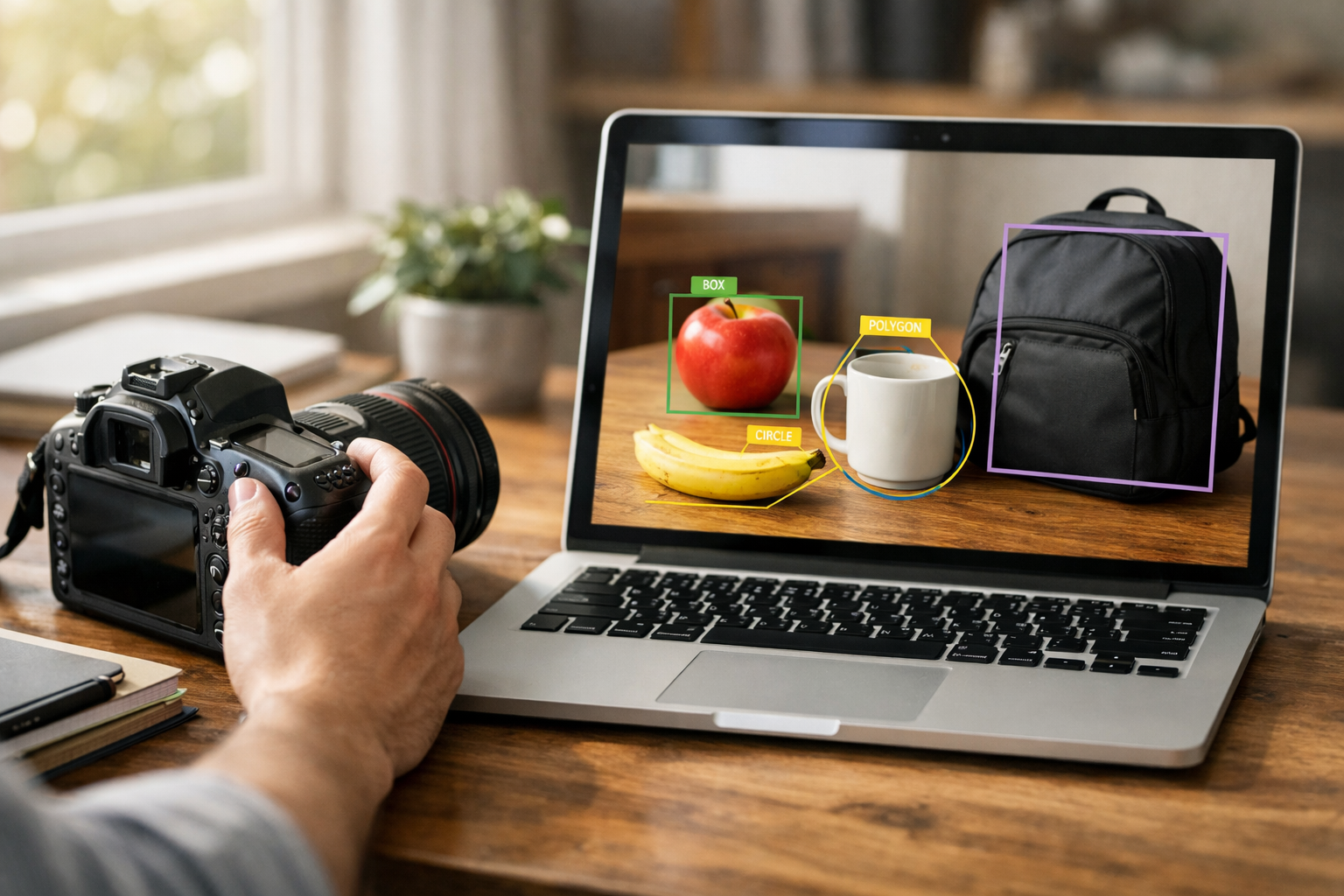
Learn how cameras and AI turn pictures into meaning
"See What AI Sees: A Simple Guide to Images and Cameras" is a beginner-friendly introduction to computer vision, one of the most exciting areas of artificial intelligence. If you have ever wondered how a phone can recognize a face, how a car can notice a stop sign, or how a store camera can count people, this course will help you understand the basics in clear, simple language. You do not need any coding, math, or AI background to start.
This course is designed like a short technical book with six connected chapters. Each chapter builds on the previous one, so you develop understanding step by step. Instead of throwing technical terms at you, the course starts from first principles: light, cameras, pictures, and how a machine turns those pictures into useful information.
By the end of the course, you will have a practical understanding of how computer vision works and where it is used in real life. You will not just memorize words. You will build a mental model that helps you explain visual AI to yourself and others.
Many introductions to AI start with code or advanced math. This one does not. It is built for complete beginners who want clear explanations before technical depth. Every concept is introduced with everyday examples, such as phone cameras, shopping apps, security systems, medical images, and smart devices. That means you can focus on understanding the ideas without feeling lost.
The structure also makes learning easier. Chapter 1 introduces the basic idea of machine sight. Chapter 2 shows how cameras turn light into digital pictures. Chapter 3 explains how AI notices patterns. Chapter 4 covers the main tasks of computer vision. Chapter 5 explores how image-based AI is trained. Chapter 6 brings everything together with real-world uses, limitations, and responsible thinking.
This course is ideal for curious learners, students, professionals exploring AI, and anyone who wants to understand modern image technology without technical barriers. It is especially useful if you want a simple entry point before moving on to more advanced topics.
Computer vision is already part of everyday life. It helps unlock phones, check products in factories, support doctors with scans, read license plates, guide robots, and improve safety systems. Understanding the basics gives you a stronger foundation for the future of work and technology. It also helps you ask better questions about privacy, fairness, and trust when AI is used with images.
If you are ready to build that foundation, Register free and begin learning at your own pace. You can also browse all courses to continue your AI learning journey after this one.
This is not a course about becoming an engineer overnight. It is a course about truly understanding the basics of visual AI so you can speak about it with confidence and continue learning with less confusion. By the end, cameras, images, and AI will feel much less mysterious. You will know what machine vision can do, how it works at a simple level, and where its strengths and limits begin.
Senior Computer Vision Engineer
Sofia Chen is a computer vision engineer who designs image-based AI systems for education and real-world products. She specializes in explaining complex visual AI ideas in simple language for first-time learners. Her teaching focuses on practical understanding rather than math-heavy theory.
When people first hear the phrase computer vision, they often imagine a machine that looks at the world exactly the way a person does. That is a useful starting image, but it is not quite true. A computer does not experience sight. It does not “understand” a face, a road sign, or a cup of coffee in the rich human sense. Instead, it receives image data, measures patterns in that data, and produces an output such as a label, a location, or a pixel-by-pixel mask. In simple words, computer vision is the field of teaching computers to get useful information from images and video.
This matters because so much of the physical world shows up visually. Roads, products, medical scans, handwritten forms, security footage, factory parts, and plant leaves all carry information in their shapes, colors, textures, and positions. If a machine can process images well, it can support people in tasks that are too repetitive, too fast, too large-scale, or too dangerous to do by hand. A phone can unlock when it sees your face. A car can notice lane markings. A warehouse system can count packages. A doctor can use image tools to help review scans. In each case, the machine is not magically “seeing”; it is transforming light into digital signals and then turning those signals into decisions.
To understand visual AI, we need a clear mental model from first principles. A camera captures light reflected from a scene. That light is converted into numbers arranged in a grid. Each tiny square in the grid is a pixel. Pixels store brightness and often color information. Resolution tells us how many pixels are available, and image quality depends on more than just pixel count: focus, lighting, motion blur, compression, noise, and viewing angle all matter. AI models then search for patterns across these pixels. Some models answer, “What is in this image?” Others answer, “Where is the object?” Others go further and answer, “Which exact pixels belong to the object?”
Those three tasks form an important beginner distinction. Image classification assigns one or more labels to a whole image, such as “cat” or “traffic sign.” Object detection finds and draws boxes around objects, such as cars, people, or bottles. Segmentation gives a more detailed map by marking the exact region of each object or class. The choice among these is not academic. It depends on the real problem. If a factory only needs to know whether a product is defective, classification may be enough. If a robot must pick up an item, detection or segmentation may be necessary.
Behind every useful vision model is data. Images must be collected, labels must be defined, and a training process must connect examples to desired outputs. If the data is too narrow, the model may fail in new conditions. If labels are sloppy, the model learns confusion. If the camera setup changes, performance may drop even when the object stays the same. Good engineering judgment means thinking not only about the model, but also about what the camera sees, what the task truly requires, and what mistakes are acceptable in the real world.
In this chapter, you will build a practical beginner view of machine sight. You will learn what computer vision really means, where it appears in daily life, how human sight differs from camera capture and AI processing, and how to think through the full workflow of a visual system. By the end, you should be able to explain the core idea of visual AI in plain language: cameras turn light into pixels, AI finds patterns in those pixels, and trained systems use those patterns to make task-specific predictions.
Practice note for Understand what computer vision is: document your objective, define a measurable success check, and run a small experiment before scaling. Capture what changed, why it changed, and what you would test next. This discipline improves reliability and makes your learning transferable to future projects.
Computer vision is the branch of AI and computing that works with images and video to extract useful information. The key word is useful. A vision system is not built to admire a sunset or appreciate a painting. It is built to answer a question or support an action. Is there a pedestrian in front of the car? Is this fruit ripe? Which shelf spaces are empty? Is there a tumor candidate in this scan? In practice, computer vision turns visual input into structured output.
A beginner mistake is to think that “seeing” means full understanding. Real systems are narrower. A model trained to detect helmets on workers may be excellent at that task and still be completely unable to describe the rest of the scene. This is normal. Vision systems are usually task-specific. They succeed when the problem is defined clearly and when the output matches what the application truly needs.
It helps to think of computer vision as a pipeline. First, a sensor captures light. Next, software represents that light as numbers. Then algorithms or neural networks look for patterns in those numbers. Finally, the system returns a result such as a class label, a bounding box, a segmentation mask, or a quality score. Even at the beginner level, this pipeline view is powerful because it prevents magical thinking. If the sensor captures poor data, the model will struggle. If the labels are unclear, the output will be unreliable. If the task is vague, the whole system becomes difficult to evaluate.
From an engineering perspective, the question is not “Can AI see?” but “What visual task can this system perform reliably enough to be useful?” That framing leads to better choices, better testing, and more realistic expectations.
Images are useful because the world contains a large amount of information in visual form. Shape can reveal object type. Color can suggest material or condition. Texture can hint at damage, disease, or surface quality. Position can indicate motion, distance relationships, or scene layout. A machine that can process images gains access to information that would otherwise require a human observer.
At the digital level, an image is a grid of pixels. Each pixel stores values, often for red, green, and blue channels. A grayscale image stores one brightness value per pixel. Resolution describes how many pixels are in the grid, such as 1920 by 1080. More pixels can capture more detail, but detail is only meaningful if the scene is well lit, focused, and stable. A blurry 4K image may be less useful than a sharp lower-resolution image. This is an important practical lesson: image quality is about signal, not marketing numbers.
Machines benefit from images because pixels are measurable. Software can compare edges, detect repeated patterns, estimate color distributions, and combine these low-level signals into higher-level predictions. Modern AI models learn these patterns from data rather than relying only on hand-written rules. For example, instead of telling a system every possible feature of a stop sign, we train it on many examples so it can learn the relevant combinations of color, shape, and context.
Common mistakes include assuming the machine sees what the human sees, ignoring lighting variation, and collecting training images from only one ideal setup. In real applications, useful image data must cover the messiness of actual deployment: shadows, reflections, different phones, dirty lenses, and changing backgrounds. That is where practical computer vision begins.
Human sight, camera capture, and AI analysis are related, but they are not the same thing. Human vision is active, adaptive, and deeply connected to memory and context. When you glance at a kitchen counter, you quickly understand cups, spoons, shadows, and partial occlusions because your brain has years of experience with similar scenes. You also move your eyes constantly, adjust attention, and combine visual input with expectations about the world.
A camera is simpler and more limited. It captures incoming light through a lens onto a sensor. The sensor turns light into electrical signals, and software converts those signals into digital pixel values. The camera does not know what it is looking at. It only records measurements. Those measurements can be distorted by noise, low light, motion blur, lens effects, and compression artifacts. If the scene is too dark or too bright, information may be lost before AI ever sees the image.
AI sits on top of camera data. It does not receive a rich human experience; it receives arrays of numbers. A model learns that certain pixel patterns often match certain labels. It may learn edges first, then textures, then object parts, then higher-level combinations. This is a useful mental model: AI reads images by finding statistical patterns, not by experiencing meaning in the human sense.
Engineering judgment comes from respecting all three layers. If a system performs badly, the cause may not be “bad AI.” The lens may be dirty, the exposure may be wrong, the training set may be biased, or the labels may not match the real task. Good practitioners compare human expectations, camera limitations, and model behavior instead of blaming one component too quickly.
Visual AI already appears in ordinary products, often so smoothly that people stop noticing it. On phones, computer vision powers face unlock, portrait mode background separation, document scanning, barcode reading, photo search, and automatic image enhancement. Each of these solves a different task. Face unlock is often a recognition or verification problem. Portrait mode uses segmentation to separate person from background. Photo search may classify scenes or detect objects like dogs, food, or beaches.
In cars, vision systems help with lane detection, traffic sign recognition, driver monitoring, parking assistance, and obstacle awareness. These systems operate under hard conditions: rain, nighttime glare, fast motion, dirt on the lens, and unusual road layouts. This is why automotive vision requires careful testing and often combines cameras with other sensors. A classroom demo that detects lanes on sunny roads is not the same as a road-ready system.
In stores, computer vision can estimate shelf inventory, detect checkout items, count visitors, reduce theft, and monitor queues. A store camera may detect products using object detection, while a shelf analysis tool may segment empty versus occupied space. In warehouses and factories, similar ideas support item sorting and defect inspection.
The practical lesson is that the same core ideas appear in many industries, but the required reliability changes dramatically. A photo app can tolerate an occasional mistake. A medical or driving system cannot. Context determines design choices, testing depth, and acceptable error.
AI can be extremely effective when the task is narrow, the data is abundant, and the environment is reasonably consistent. It can detect repeated visual patterns much faster than a human in large image collections. It can classify common objects, locate products on shelves, read printed text under good conditions, and inspect manufactured parts for known defects. In these settings, AI provides scale and consistency.
But visual AI has blind spots. It often struggles with unusual examples, rare conditions, hidden objects, poor lighting, reflections, and scenes very different from the training data. A model trained mostly on clean product photos may fail on crumpled packaging in a dim store. A face system may perform unevenly if the training data does not represent all users fairly. A detector may miss small, partially blocked, or oddly rotated objects.
Another common problem is confusing correlation with understanding. A model might identify a boat partly because water is present in the background. Remove the water, and performance can drop. This means the system has learned shortcuts rather than robust visual concepts. Beginners should remember that high accuracy on a test set does not automatically mean broad real-world understanding.
Practical teams manage these limits by collecting better data, reviewing failure cases, refining labels, and choosing the right task type. If classification is too coarse, object detection or segmentation may solve the real problem better. If false negatives are dangerous, thresholds and review processes must reflect that risk. Strong vision systems come from knowing where the model is reliable and where human oversight or extra sensors are still needed.
A complete vision system is more than a trained model. It is a chain of decisions from camera placement to final action. A useful mental model is: capture, prepare, predict, evaluate, and act. First, the camera captures light from the scene. Second, the image may be resized, normalized, cropped, or cleaned. Third, the AI model produces outputs such as classes, boxes, masks, or confidence scores. Fourth, the system evaluates whether those outputs are trustworthy enough for the use case. Finally, some action happens: unlock the phone, alert a worker, count an item, or send a case for human review.
Training is central to this process. The model learns from examples made of images plus labels. Labels might be image categories, bounding boxes around objects, or pixel-level masks. If labels are inconsistent, the model learns inconsistent behavior. If the training set lacks night scenes, the system may fail at night. Data quality is often more important than fancy architecture choices, especially for beginners building first systems.
This section also clarifies the difference between the major vision tasks. Classification answers what is present in the whole image. Detection answers what and where. Segmentation answers what, where, and exactly which pixels. Choosing correctly saves time and improves results.
A common beginner mistake is to focus only on model training and ignore deployment reality. Where will the camera be mounted? How often will lighting change? What happens when the model is uncertain? Who checks edge cases? Good vision engineering means designing the whole workflow, not just the neural network. That is the big picture you should carry into the rest of this course.
1. What is the best plain-language definition of computer vision from this chapter?
2. According to the chapter, how does a machine "see" an image?
3. Which task is the best match if a system must mark the exact region of an object in an image?
4. Why might image quality affect AI performance even when resolution is high?
5. What is a key lesson about building useful vision systems?
Before an AI system can recognize a face, count apples, or spot a stop sign, something important has to happen first: light from the real world must be captured and converted into numbers. That is the job of a camera. To a beginner, a camera may seem like a device that simply “takes a picture.” In computer vision, it helps to think more carefully. A camera is a measurement tool. It collects incoming light, focuses it, records it with a sensor, and stores the result as a digital image made of tiny picture elements called pixels.
This chapter explains that process from first principles. We will move from the physical world of light and lenses to the digital world of image grids, brightness values, and color channels. Along the way, we will connect each idea to computer vision. AI does not “see” a photo the way a person does. It receives arrays of numbers. If those numbers are blurry, noisy, too dark, too small, or poorly colored, the AI model has less useful evidence to work with. In practice, many computer vision problems are not caused by bad models at all. They are caused by weak images.
A useful mental model is this: a scene in the world reflects light, the camera gathers some of that light, the sensor measures it, software turns those measurements into an image, and then an AI system searches for patterns inside that image. Every step matters. If the lens is smudged, if motion causes blur, if the resolution is too low, or if strong shadows hide part of an object, the final image may still look acceptable to a human but become difficult for a machine to interpret reliably.
As you read, keep asking one practical question: what information is preserved, and what information is lost? Cameras never capture all of reality. They make trade-offs. They compress a 3D world into a 2D image. They sample continuous light into a fixed grid. They estimate color using sensor measurements. They also face constraints such as low light, fast motion, limited hardware, and storage size. Good computer vision engineering starts with understanding these trade-offs, because they shape what an AI model can learn and detect.
By the end of this chapter, you should be able to describe how light becomes an image, explain what pixels and color values mean, and understand why image quality has such a strong effect on AI performance. These ideas are the foundation for everything that comes next in computer vision.
Practice note for Learn how light becomes an image: document your objective, define a measurable success check, and run a small experiment before scaling. Capture what changed, why it changed, and what you would test next. This discipline improves reliability and makes your learning transferable to future projects.
Practice note for Understand pixels and image grids: document your objective, define a measurable success check, and run a small experiment before scaling. Capture what changed, why it changed, and what you would test next. This discipline improves reliability and makes your learning transferable to future projects.
Practice note for Identify the meaning of color and brightness: document your objective, define a measurable success check, and run a small experiment before scaling. Capture what changed, why it changed, and what you would test next. This discipline improves reliability and makes your learning transferable to future projects.
Practice note for See how image quality changes what AI can detect: document your objective, define a measurable success check, and run a small experiment before scaling. Capture what changed, why it changed, and what you would test next. This discipline improves reliability and makes your learning transferable to future projects.
Practice note for Learn how light becomes an image: document your objective, define a measurable success check, and run a small experiment before scaling. Capture what changed, why it changed, and what you would test next. This discipline improves reliability and makes your learning transferable to future projects.
Every photo begins with light. Objects around us do not send “images” into a camera. Instead, they reflect or emit light. A red apple looks red because its surface reflects more red wavelengths of light than others. A camera collects some of this light and tries to measure it. This is the physical starting point of computer vision.
The lens is the part of the camera that helps direct light onto the sensor. You can think of the lens as a light organizer. Without it, light from many directions would hit the sensor in a messy way. The lens bends incoming light so that points in the scene are focused onto points on the sensor. When focus is correct, edges in the scene appear sharp. When focus is wrong, details spread out and blur together. AI models often depend heavily on edges and textures, so poor focus can remove exactly the evidence the model needs.
Behind the lens sits the image sensor. This sensor is made of many tiny light-sensitive elements. Each one measures how much light reaches it during the exposure. More light generally means a stronger signal. Less light means a weaker signal. In very low light, the signal can become uncertain, which leads to noise. Noise is random variation that is not really part of the scene. To a human, noise may look like grain or speckles. To AI, noise can create false patterns or hide real ones.
Engineers also think about exposure time, aperture, and sensor sensitivity. A longer exposure captures more light, but moving objects may blur. A wider aperture lets in more light, but can change depth of field. Higher sensitivity can brighten an image, but may increase noise. These are not just photography terms; they are decision points that affect whether computer vision will work well in the real world.
A common beginner mistake is to treat the camera as fixed and the AI model as the only thing worth improving. In practice, changing lighting, lens quality, or camera setup can improve results more than changing the model. Strong computer vision work starts by respecting the physics of image capture.
Once light reaches the sensor, the camera still does not have a usable digital photo. It has raw measurements. The next step is converting those measurements into numbers that can be stored, displayed, and processed by software. This is the bridge from the physical scene to the digital image.
The real world is continuous. Light changes smoothly across space. But a digital image is discrete. The camera samples the scene at fixed positions on the sensor. Each sensor location records an amount of light, and that amount is turned into a numeric value. The result is a grid of measured values. This is the beginning of an image file.
The camera often performs additional processing as well. It may estimate color, adjust brightness, sharpen edges, reduce noise, compress the data, and save it in a format such as JPEG or PNG. These steps make images easier to store and view, but they also change the original measurements. Compression, for example, can remove subtle information. Heavy sharpening can create artificial edges. Automatic brightness adjustment can make one photo look quite different from another even if the scene is similar.
For AI, this matters because the model learns from the images it receives, not from the real-world scene itself. If two cameras process the same scene differently, a model may perform well on one and poorly on the other. This is one reason why “dataset shift” happens: the images used during training do not match the images seen later in deployment.
A practical workflow is to trace the path clearly:
Another common mistake is to think of a photo as direct truth. It is better to think of it as a processed measurement. That mindset helps when debugging vision systems. If an AI detector fails, ask whether the issue came from lighting, motion, sensor limits, camera processing, compression, or scaling. Often the answer appears before model training even begins.
A digital image is made of pixels. The word “pixel” comes from “picture element.” A pixel is not a tiny square in the real world. It is a small unit of recorded image information in a grid. If you zoom in far enough on an image, you can see this grid structure clearly.
Each pixel stores values that describe the image at one location. In a simple grayscale image, one number might represent brightness. In a color image, multiple numbers usually represent how much red, green, and blue are present. On their own, pixels are not very meaningful. A single pixel rarely tells you “this is a cat” or “this is a road.” Meaning emerges from patterns across many pixels. Edges, corners, textures, repeated shapes, and arrangements of regions are what AI models use.
This is why image grids matter. A 100 by 100 image has 10,000 pixel locations. A 1000 by 1000 image has 1,000,000 locations. More pixels can preserve more detail, but they also require more memory and computation. In engineering, this creates a trade-off. Very small images are fast to process but may lose useful detail. Very large images keep detail but may slow training and inference.
It is also important to understand that neighboring pixels are related. Natural images are not random collections of values. Nearby pixels often have similar brightness or color unless an edge or boundary is present. Computer vision algorithms take advantage of this structure. Convolutional neural networks, for example, search local neighborhoods for repeated patterns.
Beginners often assume that AI “looks at the whole image at once” in a human-like way. A better view is that AI examines structured numerical patterns over the pixel grid. If the grid is too coarse, objects may become unrecognizable. A distant person might shrink to only a few pixels, making reliable detection difficult. In practice, asking “how many pixels cover the object of interest?” is a very useful question when designing a vision system.
Brightness and color are two key parts of image representation. Brightness describes how light or dark something appears. Color describes the mixture of different wavelengths that the camera estimates. In many digital systems, color images are stored using three channels: red, green, and blue, often called RGB. Instead of one number per pixel, there are three numbers per pixel.
You can think of each channel as a separate map. The red channel says how strong the red component is at each location. The green and blue channels do the same for their colors. When these channels are combined, we see a full-color image. For computer vision, channels are simply organized numeric layers. A model can learn that certain patterns appear strongly in particular channels.
Grayscale images are simpler. Each pixel has one value representing intensity rather than three color values. Grayscale can be enough for tasks where shape, edge, and texture matter more than color. For example, reading printed text or detecting simple industrial parts may work well in grayscale. But for tasks where color separates objects from the background, removing color can hurt performance. A ripe red fruit among green leaves is easier to distinguish with color information.
There is also an important practical lesson here: color is not absolute. It changes with lighting, white balance, shadows, reflections, and camera processing. A shirt that looks blue outdoors may look different indoors. AI systems trained on one lighting setup may struggle in another if they rely too heavily on color cues.
A common mistake is to assume that more color information always means better AI. Not necessarily. Extra channels can help, but only if they are consistent and informative. Good engineering judgment means matching the image representation to the task.
Image quality is not one thing. It is a combination of several factors, especially resolution, sharpness, and noise. These strongly affect what AI can detect. If image quality is poor, even a powerful model may fail.
Resolution refers to how many pixels are in the image. Higher resolution can reveal smaller details because more pixels cover the scene. But resolution alone is not enough. An image can have many pixels and still be blurry. That brings us to sharpness. Sharpness describes how clearly edges and fine details are represented. If the camera is out of focus or the object moves during capture, sharpness decreases. Blurry boundaries make object shapes harder to identify.
Noise is unwanted variation in pixel values. It often appears in low-light situations, with small sensors, or when camera sensitivity is pushed too high. Noise can break smooth surfaces into speckled patterns and can make textures look false. In AI pipelines, noise can confuse feature extraction and reduce confidence.
These factors often interact. For example, you might increase exposure to reduce noise, but then introduce motion blur. Or you might lower image size to save computation, but then lose the tiny features needed for detection. Good vision engineering is full of these trade-offs.
A practical way to evaluate image quality for AI is to ask:
One beginner mistake is to judge images only by whether they “look okay” to a person. Humans are excellent at recognizing objects from incomplete information. AI systems are usually less forgiving. A slightly blurry barcode, small face, or distant car may be obvious to a human and still difficult for a model. When preparing data, inspect examples at the scale and quality the model will actually receive.
By now the key idea should be clear: camera decisions shape the data, and the data shape the AI. This is why camera choices matter so much in computer vision. If your goal is to build a reliable visual system, you cannot treat image capture as an afterthought.
Suppose you want AI to detect packages on a warehouse conveyor. You need to choose camera position, distance, lens, lighting, exposure, and image size. If the camera is too far away, each package may occupy too few pixels. If overhead lights create strong glare, labels may disappear. If the conveyor moves quickly and the exposure is too long, the package edges may blur. None of these are training problems first. They are capture problems first.
The same thinking applies to classification, object detection, and segmentation. In image classification, the model decides what the whole image contains, so framing and background matter. In object detection, the model must find and locate objects, so object size and sharp boundaries matter. In segmentation, the model labels pixels or regions, so fine detail and clean edges matter even more. Better image quality usually improves all three tasks, but each task is sensitive in slightly different ways.
There is also the issue of consistency. Training data should resemble deployment data. If you train on bright, clean phone photos and deploy on dim security footage, performance may drop sharply. Good teams define camera setups carefully, collect representative data, and document conditions such as lighting, angle, distance, and resolution.
Practical outcomes of good camera choices include:
The biggest lesson of this chapter is simple: AI can only learn from the visual evidence it is given. Cameras turn light into pictures, but they also decide what information enters the system in the first place. If you understand that pipeline, you are already thinking like a computer vision engineer.
1. In this chapter, what is the most accurate way to think about a camera in computer vision?
2. What does an AI system primarily receive from a digital image?
3. Why can image quality strongly affect what AI can detect?
4. Which statement best describes a key trade-off cameras make?
5. According to the chapter, what is a common reason computer vision systems fail in practice?
When people look at a picture, recognition feels almost instant. You see a cup, a face, a road, or a tree without thinking about every pixel one by one. A computer does not begin with that kind of understanding. It starts with a grid of numbers that represent brightness and color. The job of computer vision is to turn those raw numbers into useful meaning. In this chapter, we focus on the bridge between pixels and understanding: patterns.
A pattern is any visual arrangement that appears often enough to be useful. It might be a sharp edge where dark changes to light, a rounded shape that often appears in wheels, or a repeated texture like bricks, fur, or grass. AI systems look for these patterns because they help separate one thing from another. A stop sign has strong edges and a familiar shape. A cat often has fur texture, pointed ears, and eye placement that differs from a cup or a chair. The machine is not born knowing these ideas. It must learn to connect visual signals to categories and objects.
This chapter explains how machines look for visual patterns, how the idea of features helps us talk about images without complex math, and how training improves performance over time. We will connect each idea to practical pattern recognition examples so that the process feels concrete rather than mysterious. You will also see where engineering judgment matters. Real computer vision is not only about having an algorithm. It is about choosing good examples, defining clear labels, and understanding why a system succeeds or fails.
Early computer vision systems used hand-written rules such as looking for corners, circles, or line segments. Modern AI systems learn many of their own useful features from data. Even so, the basic intuition remains simple: find recurring visual clues, combine them, compare them with examples, and make the best prediction possible. This pattern-based view is useful whether the task is image classification, object detection, or segmentation. In classification, the system decides what is in the whole image. In detection, it also finds where objects are. In segmentation, it labels pixels or regions so the system understands the scene in finer detail.
As you read, keep one practical idea in mind: good visual AI is not magic. It is a careful workflow. First, collect representative images. Next, label them clearly. Then train a model to connect image patterns with those labels. Finally, test the model on new images to see whether it generalizes. If the system makes mistakes, inspect those errors and improve the data, labels, or training setup. This loop is at the heart of modern computer vision engineering.
By the end of this chapter, you should be able to describe in simple words how AI finds patterns in images and why that matters. You should also be able to recognize that visual intelligence depends on examples, labels, and repeated improvement, not just raw computing power. That perspective will make later topics easier to understand because you will already know what the model is looking for and why some visual tasks are harder than others.
Practice note for Understand how machines look for visual patterns: document your objective, define a measurable success check, and run a small experiment before scaling. Capture what changed, why it changed, and what you would test next. This discipline improves reliability and makes your learning transferable to future projects.
Practice note for Learn the idea of features without complex math: document your objective, define a measurable success check, and run a small experiment before scaling. Capture what changed, why it changed, and what you would test next. This discipline improves reliability and makes your learning transferable to future projects.
In computer vision, a pattern is any visual regularity that helps separate one image or object from another. It can be very small, such as a bright-to-dark transition over a few pixels, or much larger, such as the overall outline of a bicycle. Patterns matter because a machine cannot understand images the way humans do at first glance. It needs clues that can be measured. Those clues come from repeated arrangements of color, brightness, position, and shape.
Imagine looking at pictures of apples and tennis balls. Both may be round, but apples often have a stem region, smoother highlights, and color ranges that differ from the bright fuzzy texture of a tennis ball. The machine does not think, "this is obviously fruit." Instead, it finds recurring signals. If many apple images contain a certain combination of round shape, red or green color, and a stem-like top region, that combination becomes useful. If tennis balls often show a soft texture and a curved seam pattern, that becomes useful too.
Patterns can exist at different levels. Low-level patterns include edges, corners, and simple color changes. Mid-level patterns include parts such as windows on cars or eyes on faces. High-level patterns involve larger arrangements, such as the layout of a street scene or the shape of a human body. A strong vision system combines these levels. Engineering judgment is important here because the right pattern depends on the task. For reading handwritten digits, simple stroke patterns may be enough. For identifying animals in the wild, texture, posture, background, and body parts may all matter.
A common beginner mistake is assuming that one obvious cue is enough. In practice, robust recognition usually depends on multiple patterns working together. Good systems avoid relying too heavily on a single clue like color alone, because lighting can change. That is why computer vision models search for many overlapping signals and learn which combinations are reliable across different images.
To understand how machines look for visual patterns, it helps to break images into useful categories of evidence. Four of the most important are edges, shapes, textures, and parts. These are not mysterious AI ideas. They are practical ways of describing what changes in an image and how those changes repeat.
Edges are places where pixel values change quickly. For example, the border between a dark mug and a light table creates a strong edge. Edges often reveal boundaries, outlines, and object structure. Shapes are larger arrangements of edges. A circular clock, a triangular road sign, or the rectangular screen of a phone can often be recognized from their overall geometry. Textures describe repeated local patterns such as grass, fabric, fur, wood grain, or brick. Parts are meaningful regions that belong to a larger object, such as wheels on a car, a handle on a cup, or eyes and a nose on a face.
These cues often work together. A cat may be recognized from pointed ear shapes, fur texture, and the arrangement of facial parts. A car may be identified using strong body edges, wheel shapes, windows, and overall proportions. This is why pattern recognition is more powerful than simple color matching. Even if the lighting changes and the car appears darker, the relationship between edges and parts may still remain useful.
In engineering practice, these categories help when diagnosing errors. If a model confuses a sheep with a cloud, it may be using texture too strongly and ignoring animal parts. If it misses a road sign at night, edge contrast may be too weak in the available images. Thinking in terms of edges, shapes, textures, and parts gives you a practical language for understanding what the system may be noticing and what it may be missing. That makes improvement more systematic, especially when collecting better training examples.
Before modern deep learning became common, many computer vision systems used hand-designed rules. Engineers built detectors for edges, corners, circles, or repeated texture patterns, then combined those outputs to make decisions. This approach worked for some narrow tasks, especially in controlled environments. For example, a factory system might inspect the outline of a bottle cap or measure whether a printed label is aligned. When the environment is stable, simple rules can still be effective.
However, real-world images are messy. Objects appear in different sizes, positions, lighting conditions, and backgrounds. A dog in sunlight, shade, motion blur, or partial occlusion may look very different at the pixel level. Hand-written rules quickly become brittle. That is where learned features become important. A feature is a useful description of the image that helps the system tell categories apart. In modern AI, models learn which features matter by studying many examples rather than relying only on human-designed rules.
You do not need complex math to understand the idea. Think of features as increasingly helpful summaries. Early layers in a model may respond to edges and color transitions. Later layers may respond to more complex structures such as eyes, wheels, or leaf clusters. Still later, the model can combine those pieces into larger concepts like faces, cars, or trees. The system is learning which visual patterns are worth paying attention to.
A practical benefit of learned features is flexibility. Instead of manually defining every useful clue, engineers provide representative data and let the model discover combinations that humans might not explicitly describe. A common mistake, though, is believing the model will always learn the right thing on its own. It only learns from the examples you give it. If your dataset is biased or too narrow, the learned features may focus on shortcuts such as background color or camera angle rather than the object itself.
Training a visual AI system begins with data. Data means the images or videos the model learns from. Examples are the individual samples inside that dataset. Labels are the correct answers attached to those examples. If the task is image classification, a label might be "cat," "bus," or "banana." If the task is object detection, labels include both object names and their locations, usually with bounding boxes. If the task is segmentation, labels may mark the exact pixels belonging to each object or region.
Good labels are just as important as good images. If the labels are inconsistent, the model receives mixed messages. For example, if one annotator labels a mug as "cup" and another labels a similar object as "mug," the model may struggle unless those categories are defined carefully. Clear label definitions are part of engineering judgment. Teams often write annotation guidelines so people label similar cases in the same way.
Data quality also matters more than beginners expect. A small set of varied, relevant images is often more helpful than a large set of repetitive images. If all your training photos of shoes are taken on clean white backgrounds, the model may fail when it sees shoes on a messy floor. To generalize well, examples should include realistic variation in lighting, angle, distance, background, and object appearance.
Another practical issue is balance. If one class has thousands of examples and another has very few, the model may become biased toward the larger class. Engineers respond by collecting more examples, adjusting training methods, or checking metrics per class instead of relying on one overall score. The main lesson is simple: a vision model learns from examples and labels, so weak data usually leads to weak pattern recognition, no matter how advanced the algorithm sounds.
Training is the process where a model looks at many labeled images and gradually adjusts itself to make better predictions. At first, its guesses may be poor. After seeing repeated examples, it starts to connect certain patterns with certain labels. If images labeled "dog" often contain fur textures, ear shapes, and face arrangements, the model becomes more likely to associate those features with the dog class. This is how training helps AI improve: it strengthens useful pattern connections and weakens unhelpful ones.
Testing is different from training. During testing, the model is evaluated on images it has not seen before. This is crucial. A system that only memorizes its training images may appear accurate but fail in the real world. Good testing checks whether the model learned general patterns rather than just specific examples. In practice, teams often split data into training, validation, and test sets. The validation set helps tune settings during development, while the test set gives a final unbiased measurement.
Improving accuracy is usually an iterative process, not a one-time event. Engineers inspect failure cases and ask practical questions. Are there enough night images? Are objects too small? Are labels wrong or inconsistent? Is the model confusing similar categories such as wolves and huskies? Sometimes the best improvement comes from better data rather than a more complex model.
There is also a trade-off between raw accuracy and practical usefulness. A slightly less accurate model that is fast and stable may be better for a mobile app than a larger model that is slow. Engineering judgment means matching the system to the real task. Success in computer vision is not only about getting a number higher. It is about making the model reliable enough for the environment where it will actually be used.
AI can be impressive, but it can also make mistakes that seem surprising to humans. This usually happens because the model has learned patterns that work often, but not always. If the training data contains shortcuts, the system may rely on them too heavily. For example, if pictures of cows usually appear in grassy fields, the model may wrongly connect green pasture with "cow." Then it may struggle with a cow on a beach or in a barn. The system is still doing pattern recognition, but it is using the wrong patterns.
Visual ambiguity is another challenge. A blurry image, extreme shadow, unusual angle, or partial blockage can hide important features. A stop sign covered by snow may lose its distinctive shape and color. A model may also fail when it sees examples outside its experience, such as a rare object style, a new camera type, or different cultural settings. Humans can use broad world knowledge to fill gaps. Most vision systems cannot do that well unless they were trained on similar cases.
Common mistakes include overtrusting high-confidence predictions, ignoring dataset bias, and assuming success on a benchmark means success everywhere. In practice, you should examine where errors happen and under what conditions. Does performance drop at night? In rain? On darker backgrounds? With small objects? This kind of analysis reveals what patterns the model can and cannot handle.
The practical outcome is not to lose trust in AI, but to use it responsibly. Good teams build safeguards, improve datasets, and monitor real-world behavior after deployment. Understanding why AI gets fooled helps you design better systems. It reminds us that computer vision is not about magical seeing. It is about learning patterns from examples, and those learned patterns are only as strong as the data and decisions behind them.
1. What does a computer start with when it looks at an image?
2. In this chapter, what is a feature?
3. How does training help an AI model in computer vision?
4. Why is testing on new, unseen images important?
5. According to the chapter, what is a common reason a computer vision system fails?
In earlier chapters, you learned that a camera turns light into pixels, and that AI looks for patterns in those pixels. Now we can ask a more practical question: what exactly do computer vision systems try to do? In real projects, vision is not one single job. It is a family of related tasks. Each task answers a different kind of question about an image.
The three most important beginner-friendly tasks are image classification, object detection, and segmentation. They sound similar, but they produce very different outputs. Classification gives one overall answer for the whole image. Object detection says what is present and where it is. Segmentation goes further and marks the exact region of each object or area of interest. If you confuse these tasks, you will often choose the wrong tool, collect the wrong labels, and build a system that cannot deliver the result people actually need.
A useful way to think about computer vision is to imagine a growing level of detail. First, classify: what is this image mainly about? Next, detect: what objects are here, and where are they? Finally, segment: which exact pixels belong to each thing? These are not just academic categories. They shape the engineering workflow, the data you gather, the labels people create, the model you train, and how you evaluate success.
For example, if a factory camera only needs to decide whether a product is acceptable or defective, classification may be enough. If a warehouse robot must find boxes on a shelf, detection is more useful because it needs locations. If a medical tool must measure the exact outline of a tumor, segmentation is usually the right choice because pixel-level precision matters. Good engineering judgment starts by matching the task to the real decision that must be made.
There are also special-purpose vision jobs that build on the same ideas. Face and feature recognition focus on identifying people or important parts such as eyes, noses, corners, and landmarks. Optical character recognition, often called OCR, turns text in images into readable digital text. These tasks are common in products you already know, from phone face unlock to package scanning and document processing.
As you read this chapter, keep one question in mind: what output does the user actually need? A label, a box, a mask, a recognized face, or extracted text? That question often matters more than the choice of model. Beginners sometimes jump straight to algorithms, but professionals usually start by defining the task clearly, deciding how the results will be used, and then collecting the right examples and labels. That is how computer vision becomes useful in the real world.
In the sections that follow, we will compare these tasks in plain language, connect them to real-world use cases, and discuss common mistakes that beginners make. By the end, you should be able to look at a practical problem and say, with confidence, which kind of vision task fits best and why.
Practice note for Differentiate the core types of vision tasks: document your objective, define a measurable success check, and run a small experiment before scaling. Capture what changed, why it changed, and what you would test next. This discipline improves reliability and makes your learning transferable to future projects.
Practice note for Understand image classification in plain language: document your objective, define a measurable success check, and run a small experiment before scaling. Capture what changed, why it changed, and what you would test next. This discipline improves reliability and makes your learning transferable to future projects.
Practice note for Explain object detection and segmentation: document your objective, define a measurable success check, and run a small experiment before scaling. Capture what changed, why it changed, and what you would test next. This discipline improves reliability and makes your learning transferable to future projects.
Image classification is the simplest major vision task to understand. The system looks at an entire image and returns one main answer, or sometimes a small list of likely answers. In plain language, classification asks, “What kind of image is this?” If you show a model a photo, it might answer “cat,” “car,” “apple,” or “damaged product.” The important idea is that the output describes the whole image rather than separate parts inside it.
This task works well when the image has one dominant subject or when the goal is a single decision. A recycling machine might classify items as paper, plastic, or metal. A farm app might classify a leaf image as healthy or diseased. A security tool might classify a frame as normal activity or suspicious activity. In each case, the user wants one overall conclusion.
The workflow is straightforward. First, gather many example images. Next, assign labels to each image. Then train a model to connect visual patterns with those labels. At prediction time, the model compares the new image to the patterns it learned during training. It does not “understand” the image like a person does; it detects statistical visual clues that often appear with each class.
A common beginner mistake is using classification when there are multiple important objects in the image. If a street photo contains cars, bikes, pedestrians, and signs, one label is rarely enough. Another mistake is unclear labels. For example, if “damaged” means different things to different labelers, the model will learn inconsistent patterns. Good engineering judgment means checking whether the task truly needs only one answer and whether the classes are clearly defined.
Classification is often faster and cheaper to build than more detailed tasks because image-level labels are easier to collect than boxes or pixel masks. That makes it a good starting point for simple products. But the simplicity is also the limitation: classification tells you what is likely present overall, not where it is. If location matters, you may need detection or segmentation instead.
Object detection answers a richer question than classification. Instead of saying only what is in the image, it says what objects are present and where they are. The usual output is a set of bounding boxes, each with a class label and a confidence score. In plain language, detection says, “There is a dog here, a bicycle there, and a traffic light in the upper corner.”
This is the right task when location matters. A self-driving system must know where pedestrians and vehicles are. A retail camera may need to count products on a shelf. A warehouse robot may need to locate packages before picking them up. In all of these examples, a single label for the whole image would be too vague to support action.
The workflow for detection requires more detailed labels than classification. Human labelers usually draw rectangles around each object and assign a class name. Training data quality matters a lot. Boxes should be consistent: too loose, too tight, or missing partially hidden objects can confuse the model. If one labeler includes only the visible part of an object while another tries to guess the hidden part, the model receives mixed signals.
Object detection introduces practical engineering choices. How small are the objects? How crowded is the scene? Do objects overlap? A model that works well for large cars may struggle with tiny screws on a conveyor belt. Camera position and image resolution also matter. If important objects occupy only a few pixels, even a strong model may fail because the visual evidence is too weak.
A common mistake is expecting detection boxes to give exact shape information. Boxes are useful, but they are coarse. They tell you roughly where an object is, not its true outline. That is often enough for counting, alerting, or tracking, but not enough for accurate measurement. Detection is practical and powerful because it balances useful detail with manageable labeling effort. When a project needs “what” plus “where,” detection is often the first serious candidate.
Segmentation goes beyond boxes and works at the pixel level. Instead of drawing a rough rectangle around an object, the system labels the exact pixels that belong to that object or region. In plain language, segmentation answers, “Which parts of this image belong to the road, the person, the tumor, the sky, or the scratch?” This produces a much more detailed understanding of the scene.
There are two common forms beginners should know. Semantic segmentation labels each pixel by category, such as road, building, or tree. Instance segmentation separates individual objects, such as one person versus another person. The difference matters in practice. If a city planner wants to estimate how much of an image is road versus grass, semantic segmentation may be enough. If a robot needs to distinguish one cup from another, instance segmentation is more useful.
Segmentation is chosen when boundaries matter. In medicine, doctors may need the exact outline of an organ or lesion. In manufacturing, engineers may measure the area of a defect. In agriculture, a tool may estimate how much of a leaf surface is diseased. In autonomous driving, segmenting the drivable road area can be more helpful than just detecting cars in boxes.
The challenge is cost. Pixel-level labeling is slower and more expensive than image labels or boxes. It also requires careful instructions, because small disagreements along edges can affect training. Another common mistake is using segmentation when a simpler task would work. If all you need is whether a product is present, pixel-perfect masks may be unnecessary. They add effort without clear business value.
Good engineering judgment means asking whether the extra detail changes the decision. If the system must measure shape, area, overlap, or exact boundaries, segmentation is often worth it. If not, detection or classification may be more efficient. Segmentation is powerful because it tells the AI not only what and where, but also the precise visual extent of what matters.
Face and feature recognition are specialized computer vision tasks built on the same core ideas. Face-related systems often involve multiple stages. First, the system detects that a face is present. Next, it may locate key landmarks such as the eyes, nose, and mouth. Finally, it may compare the face to known examples to verify or identify a person. So even a familiar application like phone face unlock actually combines detection, feature finding, and recognition.
Feature recognition is broader than faces. In vision, a feature is a meaningful visual point, pattern, or part of an object. Corners, edges, landmarks, logos, fingerprints, and specific machine parts can all act as features. These are useful for alignment, tracking, measurement, and matching. For example, a factory camera may look for bolt holes or connector pins to guide assembly. A photo app may use facial landmarks to place filters correctly.
In practical terms, recognition differs from simple classification. Classification might say “this image contains a face.” Recognition asks, “Whose face is it?” That requires comparing the visual pattern to stored identities or templates. Engineering judgment matters here because recognition systems are sensitive to image quality, pose, lighting, blur, and fairness issues across different groups of people.
A common mistake is assuming recognition is perfect if detection is good. In reality, detecting a face is easier than reliably identifying it under all conditions. Sunglasses, masks, side views, low light, and aging can reduce performance. Another mistake is ignoring privacy and consent. Face recognition can be powerful, but it raises ethical and legal questions that do not apply in the same way to many other vision tasks.
For beginners, the key lesson is that face and feature recognition are not magic exceptions. They still depend on good images, clear labels, proper training data, and a well-defined output. They simply apply those principles to the special challenge of finding and matching distinctive visual patterns.
Another major job of computer vision is reading text and symbols from images. This is usually called optical character recognition, or OCR. OCR systems take a photo, scan, or video frame and convert visible text into machine-readable text. In plain language, OCR answers, “What words, numbers, or symbols appear here?” This lets software search, copy, sort, and analyze information that would otherwise stay trapped in image form.
OCR powers many everyday tools. A delivery company reads shipping labels. A banking app reads checks. A translation app reads signs through a phone camera. A factory system reads serial numbers and expiry dates. A form-processing pipeline extracts names, addresses, and invoice totals from documents. These use cases show that OCR is not just about letters. It often includes numbers, barcodes, QR codes, symbols, and document structure.
In practice, OCR often has two stages. First, the system finds where the text is located in the image. Second, it recognizes the characters or words in those regions. That means OCR can involve detection plus recognition. If the text is tilted, blurry, curved, low-contrast, or partly hidden, the job becomes harder. Lighting, font style, background clutter, and image resolution strongly affect results.
One common beginner mistake is thinking OCR will work on any photo automatically. A receipt photographed in shadow with folds and motion blur is much harder than a clean scan. Another mistake is ignoring preprocessing. Cropping, straightening, denoising, and increasing contrast can greatly improve recognition. Engineering often matters as much as model choice.
Matching OCR to the use case is also important. If a business only needs to know whether a warning symbol is present, full text extraction may be unnecessary. If it must capture exact account numbers, accuracy requirements are much stricter. OCR is a practical reminder that computer vision is often about turning visual information into structured data that another system can use.
Choosing the right vision task is one of the most important decisions in a project. The wrong choice creates wasted labeling effort, poor model performance, and outputs that users cannot act on. A good starting question is simple: what decision must the system support? If the user needs one overall label, choose classification. If the user needs locations, choose detection. If the user needs exact boundaries or area measurements, choose segmentation. If the user needs identity matching, recognition may be required. If the user needs words or numbers, OCR is the better fit.
Think about the workflow after the model runs. Will a human inspect the result? Will a robot move toward the object? Will software count items, measure damage, or read text into a database? These downstream actions tell you what output format is useful. Engineers often succeed not by choosing the fanciest model, but by selecting the simplest task that still solves the real problem.
Here is a practical way to compare use cases. A photo moderation app that labels “food” versus “not food” is a classification problem. A traffic camera that must find every vehicle is a detection problem. A medical imaging tool that measures a lesion’s size is a segmentation problem. A phone unlock feature is a recognition problem. A receipt scanner is an OCR problem. Matching the task to the use case keeps the project grounded.
Common mistakes include trying to solve everything with one model, collecting labels before defining the output, and underestimating data quality issues. If your labels do not match the desired task, training will not fix the mismatch. Another mistake is asking for pixel-perfect segmentation when boxes would do, or using classification when multiple objects must be counted.
The practical outcome of this chapter is a mindset: define the question before building the system. Computer vision is not only about teaching machines to see. It is about teaching them to produce the kind of answer that is useful, reliable, and efficient for the job at hand.
1. Which computer vision task gives one overall answer for an entire image?
2. If a system must find boxes on a warehouse shelf and show where they are, which task fits best?
3. Why is segmentation usually the right choice for measuring the exact outline of a tumor?
4. According to the chapter, what question should professionals usually answer first before choosing a model?
5. Which pairing is matched correctly to its real-world use case?
In earlier chapters, we explored what images are, how cameras turn light into pixels, and how computer vision systems look for patterns. Now we move to a very important idea: an AI vision system does not become useful just because we write code. It becomes useful because we teach it with examples. In computer vision, those examples are images, along with information that tells the system what is in each image. This is the heart of training.
A beginner-friendly way to think about training is to compare it to learning from flash cards. If you want a student to recognize apples, bicycles, and dogs, you do not just describe those things once. You show many examples. Some apples are red, some green, some sliced, some partly hidden. Some dogs are small, large, running, sleeping, indoors, or outdoors. The student slowly learns what matters and what does not. A vision model learns in a similar way, except it learns from digital image data and labels instead of spoken lessons.
This chapter focuses on the practical workflow of teaching AI with images. We will see how image data is collected and labeled, why good examples matter so much, what the basic training loop looks like, and how to think clearly about errors, bias, and fairness. These topics matter because many failures in AI do not come from mysterious math. They come from weak data, unclear labels, missing examples, or poor measurement.
When engineers build a vision system, they make many judgment calls. What images should be collected? Which classes should exist? Should we use image classification, object detection, or segmentation? How clean must the labels be before training begins? How do we know whether the model is good enough for real use? These are engineering decisions, not just coding steps. A practical builder learns to ask: does this dataset match the real world, and does this metric match the task?
A strong computer vision project usually follows a cycle rather than a straight line. First, collect images from the environment or problem you care about. Next, add labels that describe what appears in those images. Then split the data into training, validation, and test sets so the model can be taught and checked fairly. Train a model, study its mistakes, improve the data or labels, and train again. Over time, the model gets better not only because of the algorithm, but because the dataset becomes more representative and the team understands the problem more clearly.
One common beginner mistake is to focus only on the model architecture and ignore the examples used to teach it. In real projects, the quality of the dataset often matters more than choosing the fanciest model. A smaller but well-labeled dataset that reflects real conditions can outperform a larger but confusing dataset. Another common mistake is assuming accuracy alone tells the whole story. A model can score well overall while failing badly on rare categories, difficult lighting, unusual angles, or underrepresented groups.
As you read this chapter, keep one big idea in mind: a vision model learns from what it sees during training, but it can only learn what the dataset gives it a chance to notice. If examples are rich, balanced, and well-labeled, the model has a fair chance to become useful. If the examples are narrow, noisy, or biased, the model will absorb those weaknesses. Teaching AI with images is therefore both a technical task and a responsibility.
By the end of this chapter, you should be able to describe the full beginner workflow of training a visual AI system in simple words. You should also be able to explain why labels matter, why example quality matters, and why fairness and evaluation must be part of the process from the beginning rather than an afterthought.
A useful image dataset is not simply a folder full of pictures. It is a collection of examples that helps a model learn the right patterns for the job it will face in the real world. If the task is to detect helmets on a construction site, the dataset should include workers in different poses, lighting conditions, weather, camera angles, distances, and background clutter. If all training images are taken on a sunny day from one perfect viewpoint, the model may fail as soon as the environment changes.
This is why good examples matter. A strong dataset contains variety. It shows objects large and small, centered and off to the side, partly hidden and fully visible. It includes normal cases and difficult cases. It also includes enough examples from each important category so that the model does not treat rare but important situations as unimportant. In practice, beginners often collect easy images first because they are convenient. That is understandable, but it creates a gap between training data and real use.
Another key idea is representativeness. The images should resemble the actual world where the model will be used. If a retail shelf model will run on store cameras, data from online product photos is not enough. If a medical model will be used across different clinics, the dataset should include images from different devices and settings. Engineering judgment means asking where the images come from, who captured them, under what conditions, and whether those conditions match deployment.
Teams also need to define the task clearly before collecting data. Are we classifying one main object per image, detecting multiple objects, or segmenting exact boundaries? The answer changes what images are useful. It also changes how much detail is needed in the labels. A dataset is useful when its images, labels, and real-world goal all align.
Good practice includes keeping separate sets for training, validation, and testing. The training set teaches the model. The validation set helps tune decisions during development. The test set is saved for final checking. Mixing these sets is a serious mistake because it can make a weak model look stronger than it is. A useful dataset is therefore not just diverse and realistic. It is also organized carefully so performance can be judged honestly.
Once images are collected, the next step is labeling. A label tells the model what it should learn from an image. The type of label depends on the task. For image classification, the label may be one category for the whole image, such as cat, car, or pizza. For object detection, labels usually include category names plus bounding boxes that mark where each object appears. For segmentation, labels go even further by marking the exact pixels belonging to each object or region.
These forms of labeling are not interchangeable. If you only know that an image contains a dog somewhere, that might be enough for classification, but not enough to teach a model where the dog is. If a robot must avoid objects on the floor, a rough box may help, but a pixel-precise mask may be better. Choosing the right label format is an engineering decision tied to the practical outcome you need.
Label quality matters as much as label type. Categories should be clearly defined. For example, if one labeler marks a pickup truck as a car while another marks it as a truck, the model receives mixed signals. Teams often create labeling guidelines with examples to reduce confusion. These guidelines explain class definitions, how to handle partly visible objects, when to ignore tiny objects, and how to label difficult cases.
There is also a tradeoff between speed and detail. Image-level labels are faster and cheaper. Boxes take more effort. Masks are the most detailed and often the most expensive to create. Beginners sometimes assume more detail is always better, but that is not true. The right choice depends on the application. If the goal is simply to sort photos into broad categories, segmentation may be unnecessary. If the goal is to estimate the area of a tumor or the drivable road surface, detailed masks may be essential.
A common mistake is to underestimate the cost of labeling and quality control. Human labelers make mistakes, especially when categories overlap or images are blurry. Good workflows include review steps, spot checks, and clear instructions. In short, labels are the teaching language of a vision system. If that language is vague or inconsistent, the model will learn poorly no matter how advanced the training code is.
In a classroom example, datasets look neat and organized. In real projects, data is often messy. Images may be duplicated, mislabeled, blurry, overexposed, cropped incorrectly, or saved in inconsistent formats. Some files may be missing labels. Others may contain the right object but in a way that does not match the problem. Learning to deal with messy data is one of the most practical skills in computer vision engineering.
Clean data does not mean perfect data. It means data that is trustworthy enough for the task. A little noise can be acceptable, but systematic problems are dangerous. If many night-time images are mislabeled, the model may perform badly at night. If one camera adds a color tint and all images from that camera belong to one category, the model might cheat by learning camera style instead of object content. This is called learning a shortcut, and it often leads to failure outside the training environment.
Data cleaning usually includes checking label consistency, removing broken files, deduplicating repeated images, and identifying strange outliers. It also means noticing hidden patterns that should not drive decisions. For example, if all pictures of healthy plants come from one greenhouse and all diseased plants come from another, the model might learn the background instead of the plant condition. This is a very common beginner mistake.
At the same time, do not confuse realistic messiness with useless messiness. Real-world images are not always sharp and centered. They may include shadows, motion blur, partial occlusion, reflections, or clutter. If those conditions will appear after deployment, the dataset should include them. Removing every difficult image can make the training set too artificial. The goal is not to create a beautiful dataset. The goal is to create a dataset that prepares the model for reality.
Good engineering judgment asks which messiness reflects true operating conditions and which messiness is harmful noise. That distinction guides cleaning decisions. A practical team documents these choices, because future improvements depend on understanding what was removed, what was kept, and why.
Training a vision model is best understood as repeated practice with feedback. During training, the model looks at labeled images, makes predictions, compares those predictions with the correct answers, and adjusts its internal parameters. It repeats this process many times. Over time, the model becomes better at recognizing useful visual patterns. This is the basic idea behind learning in modern computer vision.
Beginners sometimes imagine training as a one-time event: collect data, click train, and receive a finished model. Real projects are more iterative. After the first training run, engineers review mistakes carefully. Which classes are confused with each other? Does the model fail on small objects? Does performance drop in poor lighting? These mistakes guide the next improvement step. Sometimes the solution is more data. Sometimes it is better labels. Sometimes the class definitions need to be changed. Sometimes the model itself needs adjustment.
A practical workflow often looks like this: collect and label data, split it into train, validation, and test sets, train a baseline model, inspect sample predictions, analyze failure cases, improve the dataset or settings, and train again. This loop is where much real progress happens. The model improves not just because it practices, but because people learn from feedback and redesign the training process.
It is also important to avoid overfitting. A model that memorizes the training images may look strong during practice but fail on new data. That is why validation and test sets matter. They show whether the model is learning general patterns or just remembering examples it has already seen. Data augmentation, such as flipping, cropping, or adjusting brightness, can help expose the model to more variation, but augmentation should reflect realistic conditions.
Common mistakes include changing too many things at once, judging the model from only one metric, or ignoring error patterns in minority cases. Good practice means making careful improvements, tracking what changed, and using feedback from both numbers and example images. Teaching AI with images is not only about feeding data to a model. It is about building a disciplined improvement loop.
Bias in computer vision often begins with the dataset. If some groups, conditions, or environments are underrepresented, the model may perform well for some cases and poorly for others. This does not always happen because someone intended harm. Very often, it happens because important examples were missing during data collection or because labeling rules treated certain cases inconsistently.
Imagine training a face-related system mostly on lighter skin tones, or a road-scene model mostly on daytime images from one country, or a crop disease detector mostly on one plant variety. The model may appear accurate overall while giving weaker results for other populations or settings. This is why fairness issues must be discussed early. Waiting until the end can make problems harder and more expensive to fix.
Missing examples are especially dangerous because they create blind spots. A model cannot learn patterns it rarely or never sees. If safety helmets are usually bright yellow in the training set, a model may struggle with other colors. If wheelchairs, walking aids, or uncommon clothing styles rarely appear, the system may perform unevenly across people. These are not just technical gaps. They can lead to exclusion or harm when the system is used in the real world.
Practical teams reduce bias by examining who and what is represented in the data, collecting examples from different conditions, and checking performance across meaningful subgroups. They also review labels for consistency and ask whether class definitions themselves create unfairness. Sometimes the right decision is to limit where a model can be used until the data is improved.
A common beginner mistake is to assume that more data automatically solves bias. More of the same kind of data does not fix missing diversity. The better approach is targeted data collection: add examples from underrepresented conditions and populations, then measure whether results improve. Responsible vision engineering means recognizing that accuracy is not the only goal. A useful model should also behave reasonably and fairly across the people and environments it affects.
After a model is trained, we need to measure whether it actually works. For beginners, the simplest idea is this: compare the model's predictions to the correct answers on images it has not seen before. If the predictions are often right, that is a good sign. But measuring success requires more than one simple percentage, because different tasks and mistakes matter in different ways.
For image classification, accuracy can be a useful starting point: how many images were labeled correctly? But if one category is much more common than others, accuracy can be misleading. A model might guess the common class most of the time and still look good by that measure. For detection, success includes both finding the right object and locating it well enough. For segmentation, success depends on how closely the predicted region matches the true pixels.
Beginner-friendly thinking often uses questions like these: Does the model find most of the objects we care about? When it claims something is present, is it usually correct? Does it work on difficult images, not just easy ones? Does performance stay acceptable across different categories and conditions? These plain-language questions connect metrics to real use. They also help non-experts understand tradeoffs. For example, a safety system may prefer to catch more possible hazards even if that creates some false alarms, while a photo search tool may prefer fewer wrong matches.
Evaluation should include both summary numbers and visual inspection. Looking at example predictions can reveal problems hidden by averages, such as consistent failure on small objects or under low light. Teams should also test on realistic data from the deployment environment whenever possible. A benchmark score is helpful, but real-world usefulness matters more.
Finally, success should be defined before deployment, not after. Decide what “good enough” means for the task, who may be affected by mistakes, and which failure modes are unacceptable. Measuring success is not about proving the model is perfect. It is about understanding what it can do, where it fails, and whether it is reliable enough for the job.
1. According to the chapter, what is the core idea behind training a computer vision model?
2. Why does the chapter emphasize using examples that resemble real-world conditions?
3. What is the purpose of splitting data into training, validation, and test sets?
4. Which mistake does the chapter describe as common for beginners?
5. Why is accuracy alone not enough to judge a vision model?
By now, you have learned the core ideas behind computer vision: cameras capture light, images become grids of pixels, and AI models learn patterns from labeled examples. This final chapter brings those ideas into the real world. Computer vision is not only a lab topic or a flashy demo. It is part of everyday systems that help people count products, inspect crops, assist doctors, unlock phones, sort packages, and monitor safety conditions. The important beginner lesson is that a vision system is never just a model. It is a full workflow that includes a camera, lighting, image quality, data collection, labels, model training, testing, decisions, and human response.
In practice, good computer vision depends on engineering judgment as much as on AI. A model may work well on clean training images but fail on rainy streets, blurry warehouse cameras, dark hospital rooms, or cluttered checkout counters. A responsible builder asks not only, “Can the model predict?” but also, “Should this system be used here, under these conditions, with these risks?” Real-world computer vision succeeds when it is connected to a clear task, measured carefully, and used with appropriate limits.
Throughout this chapter, keep three simple ideas in mind. First, the goal matters. Detecting a missing hard hat on a construction site is different from recognizing fruit types in a grocery app. Second, context matters. A system trained in one place may not transfer well to another place with different cameras, people, weather, or products. Third, consequences matter. If a mistake only causes a slow checkout, that is very different from a mistake in healthcare or road safety.
As a beginner, you do not need to build everything at once. But you should understand how to evaluate a vision system like a careful engineer. Ask what images it sees, what output it gives, what types of errors are likely, and what humans should do when confidence is low. This chapter will help you explore practical uses, understand limits and risks, judge systems responsibly, and finish with a clear roadmap for what to learn next.
Practice note for Explore practical uses of computer vision: document your objective, define a measurable success check, and run a small experiment before scaling. Capture what changed, why it changed, and what you would test next. This discipline improves reliability and makes your learning transferable to future projects.
Practice note for Understand the limits and risks of visual AI: document your objective, define a measurable success check, and run a small experiment before scaling. Capture what changed, why it changed, and what you would test next. This discipline improves reliability and makes your learning transferable to future projects.
Practice note for Learn how to judge a vision system responsibly: document your objective, define a measurable success check, and run a small experiment before scaling. Capture what changed, why it changed, and what you would test next. This discipline improves reliability and makes your learning transferable to future projects.
Practice note for Finish with a clear beginner roadmap for next steps: document your objective, define a measurable success check, and run a small experiment before scaling. Capture what changed, why it changed, and what you would test next. This discipline improves reliability and makes your learning transferable to future projects.
Practice note for Explore practical uses of computer vision: document your objective, define a measurable success check, and run a small experiment before scaling. Capture what changed, why it changed, and what you would test next. This discipline improves reliability and makes your learning transferable to future projects.
Practice note for Understand the limits and risks of visual AI: document your objective, define a measurable success check, and run a small experiment before scaling. Capture what changed, why it changed, and what you would test next. This discipline improves reliability and makes your learning transferable to future projects.
Practice note for Learn how to judge a vision system responsibly: document your objective, define a measurable success check, and run a small experiment before scaling. Capture what changed, why it changed, and what you would test next. This discipline improves reliability and makes your learning transferable to future projects.
Computer vision becomes most meaningful when tied to a real job. In healthcare, vision systems can help examine medical images, highlight suspicious regions, count cells, or support workflow by organizing scans. A beginner should remember that these systems usually assist trained professionals rather than replace them. A model might find patterns in X-rays or microscope images, but final decisions often require medical judgment, patient history, and other tests. This is a good example of practical AI: the model narrows attention, and the human makes the final call.
In retail, computer vision is used for shelf monitoring, inventory counting, barcode-free checkout, product recognition, and loss prevention. The challenge is not only recognizing an item but doing so under messy conditions: overlapping products, changing packaging, reflections from store lighting, and partially blocked labels. A model trained on neat catalog photos will often struggle in a real store. This is why data collection from actual shelves and actual cameras matters so much.
In farming, computer vision helps monitor crop health, detect weeds, count fruit, estimate ripeness, and inspect livestock. Here, image conditions change constantly because of weather, dust, shadows, seasons, and plant growth stages. The same field can look very different in the morning, at noon, and after rain. Strong systems are trained on wide variation, not just perfect sunny-day examples. Farming also shows how vision can improve efficiency: identify where fertilizer is needed, spot disease earlier, or guide robots to harvest more accurately.
Safety applications are another major area. Vision systems can detect whether workers are wearing helmets or vests, whether a zone is clear before machinery starts, or whether smoke or flames appear in a monitored area. These uses sound straightforward, but they require care. A safety alert system must be designed around the cost of missing a real danger. In other words, false negatives can matter more than false positives. This affects threshold choices, camera placement, and whether a human must always review alerts.
The practical outcome is simple: computer vision is useful when the task is concrete, images match reality, and the system fits into a human workflow. The best projects begin with one narrow problem, one measurable result, and one clear action after prediction.
Many people use computer vision every day without thinking about it. Phone cameras detect faces for focus, improve low-light images, blur backgrounds in portraits, and help unlock devices. Security cameras can count visitors, detect motion, or flag unusual activity. Self-check systems in stores try to recognize products quickly so customers can complete transactions with less scanning. These examples teach an important lesson: real-world vision often runs on edge devices, meaning the AI works directly on a phone, camera, kiosk, or small local computer rather than sending every image to a distant server.
Running vision on a device has practical benefits. It can reduce delay, lower internet use, and sometimes improve privacy because images do not always need to leave the device. But edge systems also face limits. Phones and smart cameras have smaller batteries, less memory, and less processing power than large cloud machines. That means engineers often choose smaller models, lower image resolution, or less frequent analysis. There is always a trade-off between speed, cost, battery life, and accuracy.
Self-check systems show how workflow matters. It is not enough to classify an image correctly in isolation. The system must also handle bags, hands, crumpled packaging, similar-looking products, and quick customer movement. It may need object detection to find items, classification to identify them, and a confidence score to decide when to ask for human help. A good design includes fallback steps such as manual barcode entry or staff review when confidence is low.
Smart camera projects also depend heavily on placement and environment. A camera mounted too high may miss detail. A camera facing a window may struggle because of backlighting. A phone app may work differently indoors and outdoors. Common beginner mistakes include assuming higher resolution solves everything, ignoring motion blur, and forgetting that models trained on one camera may not perform the same on another camera with different color balance or lens distortion.
The practical engineering workflow is usually: define the task, collect sample images from the real device, test under realistic lighting, measure failure cases, and then improve either the model or the setup. Sometimes the best improvement is not a more advanced neural network. It might simply be better lighting, a more stable camera angle, or a clearer user flow.
Because computer vision deals with images, it often deals with people, homes, workplaces, and personal spaces. That makes privacy and consent central topics, not optional extras. If a system captures faces, license plates, medical scans, classroom video, or home camera footage, then the data may be sensitive even before any AI model is applied. Responsible image use begins with asking whether you truly need the images, whether people know images are being collected, and how long those images will be stored.
Consent means people should understand what is being captured and why. In some settings, such as workplaces, stores, schools, or public events, legal and ethical expectations may differ, but clear communication is still important. A beginner building a prototype should think beyond technical accuracy. Who appears in the images? Did they agree? Could the data reveal identity or behavior patterns? Could someone be harmed if the images were leaked or misused?
Responsible design often includes practical safeguards. Store only what is necessary. Remove identifying details when possible. Limit access to the data. Delete images when they are no longer needed. Consider whether the task can be done with less invasive signals, such as counting objects without saving raw faces. In some cases, processing images directly on the device can reduce risk because data does not need to be transmitted widely.
Another key issue is bias and fairness. If training data mostly contains certain environments, skin tones, clothing styles, product types, or age groups, then the system may perform unevenly across users. That is not just a technical bug; it can become a fairness problem. Responsible evaluation means checking how the model behaves across different groups and conditions, not only looking at one average accuracy number.
A trustworthy computer vision system is not only accurate. It is transparent, limited to a justified purpose, and respectful of the people affected by it.
One of the most important real-world skills is knowing when a vision system may be wrong. AI does not “see” like a human. It finds statistical patterns in pixels based on training examples. That means it can be confident for the wrong reasons. A model may learn to associate snow with wolves, bright store shelves with certain products, or hospital machine markings with disease labels. If those shortcuts appear in training data, the model may seem smart while actually relying on weak clues.
You should be cautious when images differ from training conditions. Poor lighting, blur, fog, unusual camera angles, damaged objects, reflections, shadows, and clutter can all reduce reliability. Rare cases are especially difficult. If a model mostly trained on common products or normal road scenes, it may fail on unusual packaging, rare animals, emergency vehicles, or construction changes. This is why test data must include hard examples, not just easy ones.
Confidence scores can help, but they are not magic. A high confidence prediction is not a guarantee of truth. In some systems, the model may be very certain even when wrong. That is why calibration and real-world validation matter. If the cost of error is high, predictions should trigger review rather than automatic action. For example, in medical support or safety monitoring, AI output may be best used as an alert, not as a final decision.
Another warning sign is distribution shift, meaning the world has changed since training. New products arrive in stores. Seasons change on farms. Cameras are replaced. Uniforms, roads, and lighting conditions change. A model that performed well six months ago may quietly become less reliable over time. Real deployments need ongoing monitoring, updated data, and periodic retraining.
As a beginner, here is a practical rule: do not trust a vision model just because it worked in a demo. Trust must be earned through testing under realistic conditions, understanding failure modes, and creating a safe fallback when the system is uncertain. Good engineers treat mistakes as expected events to design for, not as surprises to ignore.
Before building or buying a computer vision system, ask a set of practical questions. These questions help you judge whether the system fits the job responsibly. First, what is the exact task? “Use AI on camera footage” is too vague. A better task is “detect whether a worker enters a restricted zone” or “count apples on a conveyor belt.” A narrow task leads to clearer data collection and better evaluation.
Second, what kind of output is needed? Do you need one label for the whole image, a box around each object, or a pixel-level mask? This connects directly to earlier course ideas: classification, detection, and segmentation solve different problems. Choosing the wrong type of output is a common beginner mistake. If you need to know where items are, image classification alone is not enough.
Third, what are the consequences of errors? If a false alarm is cheap but a missed detection is dangerous, then the system should be tuned differently. You may prefer more alerts and more human review. Fourth, what data was the model trained on, and does it match your environment? If not, expect performance gaps. Ask about camera type, lighting, geography, season, background clutter, and user population.
Fifth, how will the system be tested? You need examples from the real world, not only clean sample images. Also ask who will handle uncertain cases. Does the workflow include a human override? Can users correct mistakes? Is there a log for auditing errors? Finally, ask about privacy, consent, storage, and maintenance. A working model today is not the end of the job.
These questions turn computer vision from a buzzword into an engineering decision. They help you judge systems responsibly, even if you are still a beginner.
You now have a beginner-friendly map of computer vision. You understand that images are made of pixels, that cameras capture light under real physical limits, and that AI learns patterns from data and labels. You also know the major problem types: classification, object detection, and segmentation. The next step is to turn those concepts into hands-on intuition.
A good roadmap starts with observation. Use your phone camera and notice how lighting, angle, blur, and distance change an image. Then study a few public image datasets and look at their labels. Ask yourself whether the labels are clear, whether the images are diverse, and what a model might find confusing. This strengthens your understanding of data quality before you ever train a model.
After that, try one small practical project. For example, classify two or three simple object categories, or test an object detector on household items. Keep the project narrow. Collect your own images, split them into training and testing sets, and examine the mistakes carefully. The learning value comes not from high accuracy alone but from understanding why errors happen. This is how engineering judgment develops.
As you progress, learn basic evaluation terms such as precision, recall, false positives, false negatives, and confusion matrix. These ideas will help you judge models more responsibly than using one accuracy number by itself. Also begin reading about deployment topics such as edge devices, inference speed, model size, and monitoring drift over time.
Most importantly, keep the human and ethical side in view. Ask whether the vision system is useful, fair, private, and safe enough for its setting. Computer vision is powerful because it connects digital systems to the visible world. That power should be used carefully.
From here, your next steps are clear: keep looking closely, keep testing ideas against reality, and keep asking what the model sees, what it misses, and what should happen when it is wrong. That mindset will serve you well in every future computer vision project.
1. According to the chapter, what is a vision system in the real world?
2. Why might a computer vision model fail after performing well in training?
3. Which of the chapter's three simple ideas focuses on how serious mistakes can be?
4. What is a responsible question to ask when judging a vision system?
5. As a beginner, what does the chapter recommend when evaluating a vision system?

- Learning Evolved.
- Intelligence Amplified.


