Computing — April 17, 2026 — Edu AI Team
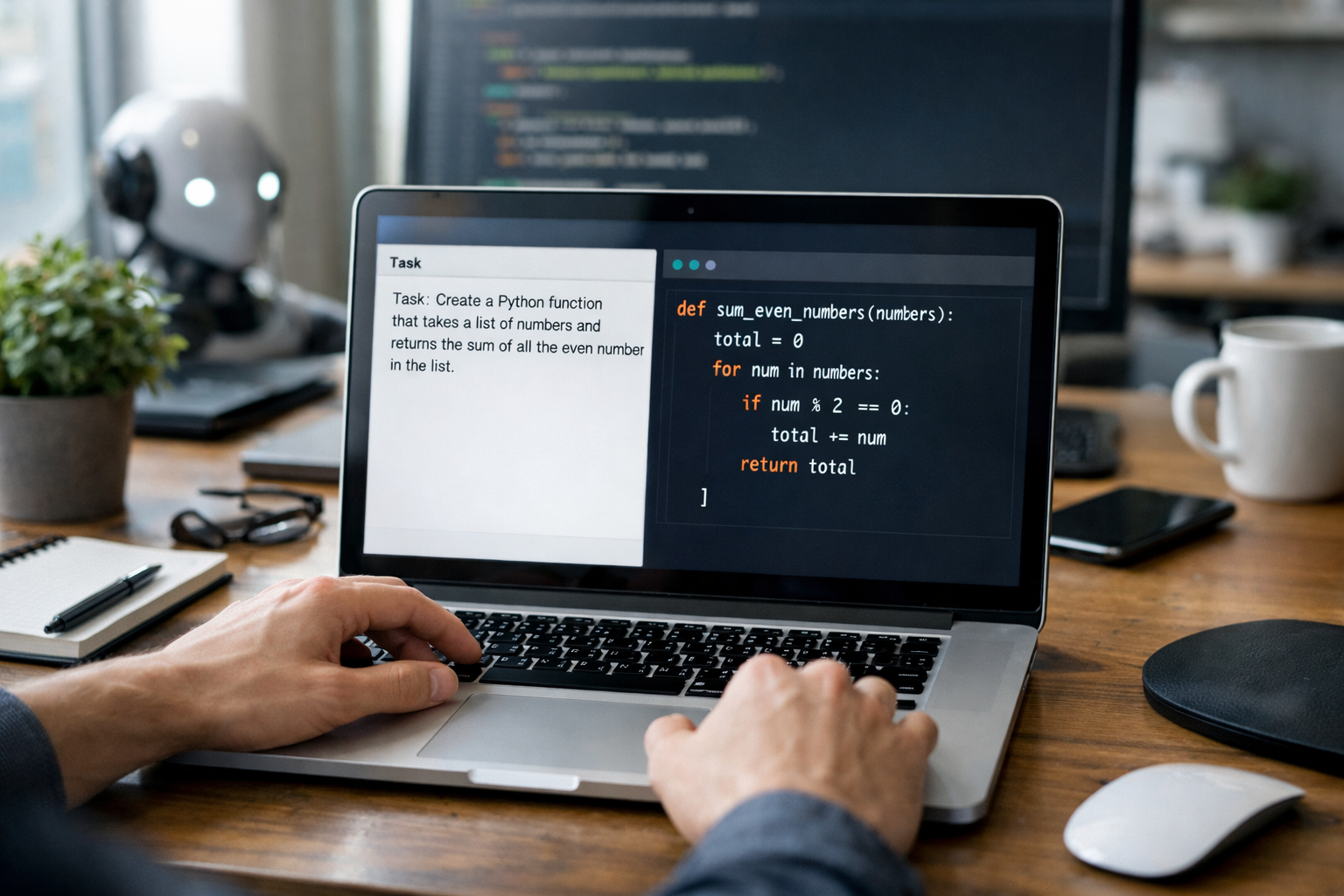
Natural language to code means using AI to turn everyday instructions like “build a calculator” or “sort this list from highest to lowest” into working computer programs. In simple terms, the AI reads your plain English, guesses what task you want, and writes code in a programming language such as Python or JavaScript. It can save time, help beginners get started faster, and make coding feel less intimidating—but it still needs human checking because AI can make mistakes.
This idea sounds almost magical at first. For someone new to technology, it can feel like talking to a machine and getting software back. But the process is not magic. It is pattern recognition. The AI has learned from huge amounts of text and code, so it can predict what code usually comes next when someone describes a task in words.
In this guide, we will explain how AI turns plain English into code, what happens behind the scenes, where it works well, where it breaks, and how beginners can use it wisely.
Natural language is the language people use every day, such as English. Code is the structured set of instructions computers follow. Natural language to code is the process of translating a human request into a program the computer can run.
For example, a beginner might type:
An AI coding tool can take one of those requests and produce code in seconds. That speed is one reason these tools are growing so quickly in education and work.
However, the output is only as good as the instruction. If your request is unclear, the code may be incomplete, wrong, or unsafe. Think of AI coding as a very fast assistant, not a perfect engineer.
First, the AI looks at the words you typed. It tries to understand the goal, the programming language you want, and any rules or limits. If you say “Write Python code,” it knows the target language. If you say “Build a beginner-friendly script with comments,” it also knows to explain the code clearly.
Modern AI systems are trained on large collections of writing, documentation, and code examples. Training means the system studies patterns. It does not “understand” like a human does. Instead, it becomes very good at predicting likely answers based on previous examples.
So if millions of examples connect the phrase “sort a list in Python” with code using sorted() or .sort(), the AI learns that pattern.
Next, the AI predicts the most likely code that matches your request. It builds the program one piece at a time. For a simple calculator, that may mean:
This happens very quickly, often in under 10 seconds for small tasks.
Many AI tools do more than just write code. They can explain what each line does in plain English. This is especially useful for beginners because you can learn the logic, not just copy the answer.
This is the part many newcomers miss. AI-generated code can contain bugs. A bug is a mistake in a program that causes the wrong result or makes it fail. The AI may also miss edge cases, which are unusual situations such as empty input, negative numbers, or invalid text.
That is why the best habit is: ask, read, test, improve.
Let’s say you ask an AI tool:
“Write a Python program that asks for a student’s test score and prints ‘Pass’ if the score is 50 or more, otherwise prints ‘Fail’.”
The AI might generate code like this:
score = int(input("Enter the test score: "))
if score >= 50:
print("Pass")
else:
print("Fail")
Even if you have never coded before, you can start to read the structure:
This shows why natural language to code is so powerful for beginners. You can start from a sentence you already understand, then study the code the AI creates. If you want to build stronger foundations in this area, it helps to browse our AI courses and beginner programming lessons that explain Python step by step.
For many people, coding feels hard because the first barrier is the syntax. Syntax means the exact writing rules of a programming language. A missing bracket or colon can break a program.
Natural language to code lowers that barrier. Instead of memorising every rule from day one, you can describe what you want and learn from the generated example.
Some beginner-friendly benefits include:
For career changers, this also matters because it shortens the gap between “I have an idea” and “I made something that works.” That quick feedback can keep motivation high in the early learning stage.
AI is often useful for small, clear tasks. Here are common examples where it performs well:
If you ask for something focused and specific, the results are usually better. “Write a Python function that counts vowels in a word” is easier for AI than “Build a complete social media platform.”
AI-generated code is helpful, but it is not flawless. Beginners should know the main limits.
One of the biggest risks is that AI may produce code that looks professional but does not run correctly. This can be frustrating if you do not yet know how to debug, which means finding and fixing errors.
If you say, “Make a finance app,” that could mean 20 different things. Do you want budgeting, charts, expense tracking, or tax calculations? Better prompts lead to better code.
Security means protecting data and preventing misuse. Performance means how efficiently the program runs. AI can miss both, especially in larger projects.
If you only paste prompts and copy answers, progress will be slow. Real improvement comes from reading the output, testing it, changing it, and understanding why it works.
A prompt is the instruction you give the AI. A stronger prompt usually includes four parts:
For example, instead of saying:
“Make a program for expenses.”
Try saying:
“Write a beginner-friendly Python program with comments that asks the user to enter 5 daily expenses, stores them in a list, and prints the total and average.”
The second version gives the AI much more to work with. You are likely to get cleaner, more useful code.
Yes—if you use it as a learning tool, not a shortcut that replaces thinking. The best beginners use AI to:
Over time, those small wins build real skill. You begin to recognise patterns, understand basic logic, and write parts of the code yourself.
This is also why structured learning matters. A course can help you move from random prompts to actual understanding. If you are starting from zero, you can view course pricing and compare beginner-friendly options that fit your goals and budget.
Plain English coding will likely become more common, but traditional coding skills will still matter. Why? Because computers need precision. Human language is flexible and sometimes unclear. Code must be exact.
In the future, many people may start with English, then refine the result in code. This could open programming to millions more learners, including people from non-technical backgrounds. It may also change jobs by making software creation faster and more collaborative.
But the core skills will remain valuable: problem-solving, logical thinking, testing, and understanding how programs behave. AI helps with speed. Human understanding provides direction.
If natural language to code has made programming feel more approachable, the best next step is to combine curiosity with guided practice. Start with simple Python tasks, ask AI to explain every line, and test small changes yourself.
When you are ready to go further, register free on Edu AI to begin learning with beginner-friendly courses in Python, AI, machine learning, and related topics. A clear learning path can help you move from “I can describe an idea” to “I can build it with confidence.”



- Learning Evolved.
- Intelligence Amplified.